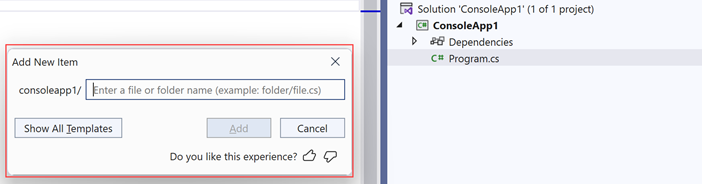
| Add New Item |
|
|
| Add Multiple Items |
|
|
| Files Created |
Cool features in Visual Studio 2022
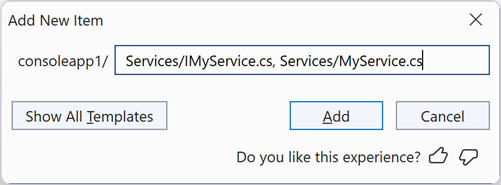
| Add New Item |
|
|
| Add Multiple Items |
|
|
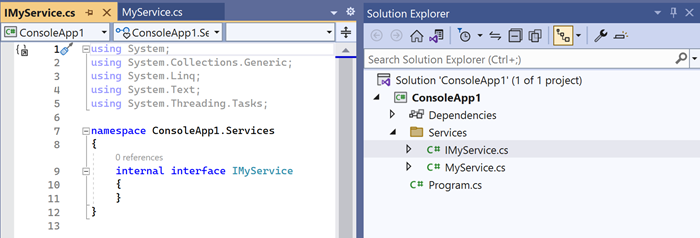
| Files Created |
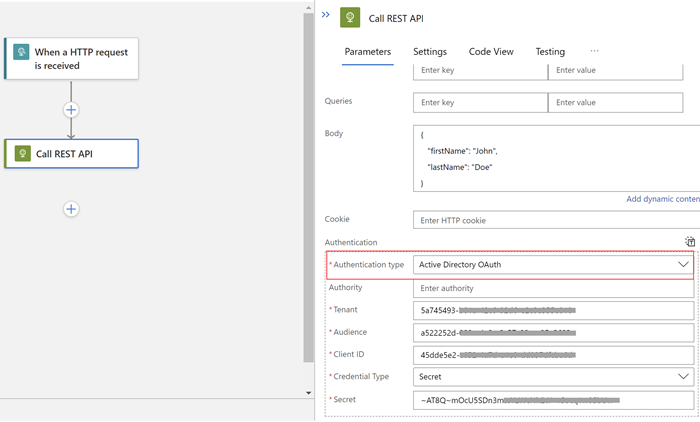
In this post let's see how easy it is to call REST API secured with Azure AD (or Azure AD B2C).
First, we need to select the Authentication type as Active Directory OAuth.
Then it's just a matter of entering the required information.
| Active Directory OAuth |
Happy Coding.
In this post, let's have a look at this nice little feature that's available with .NET 7 and C# 11.0.
With .NET 6 and C# 10.0, we have got a simplified method to check an Argument for null (I have written a post a few months ago: C# 10.0: Nice Little Features).
ArgumentNullException.ThrowIfNull(argument);
But if the argument type is a string, and you need to check it for Empty, we had to fall back to the old approach, which is something like below.
string @string = ""; if (string.IsNullOrEmpty(@string)) { throw new ArgumentNullException(nameof(@string)); };
And with .NET 7 and C# 11.0, we don't have to do that anymore. We now have: ArgumentException.ThrowIfNullOrEmpty()
string @string = ""; ArgumentNullException.ThrowIfNullOrEmpty(@string);
I really like this, It's a small thing, but of course, small things matter.
Hope this helps.
Happy Coding.
Today we had our Microsoft Ignite After Party in Auckland, New Zealand and it was great to be part of it with fellow MVPs in New Zealand.
There I was in a Panel Discussion discussing a lot of nice things coming with .NET 7.|
|
| Microsoft Ignite After Party: Auckland, New Zealand |
Happy Coding.
Regards,
Jaliya
In this post let's see how easy it is to set up HTTP Logging in an ASP.NET Core application.
You just need to add the HTTP Logging middleware to the HTTP pipeline.
WebApplication app = builder.Build(); // Enable HTTP Logging app.UseHttpLogging();
The default logging configuration for Microsoft.AspNetCore is Warning. You might need to update appsettings.json as follows.
{
"Logging": {
"LogLevel": {
"Default": "Information",
"Microsoft.AspNetCore": "Warning",
"Microsoft.AspNetCore.HttpLogging.HttpLoggingMiddleware": "Information"
}
}
}
|
|
| Default Logging |
WebApplicationBuilder builder = WebApplication.CreateBuilder(args); // Customize HTTP Logging options builder.Services.AddHttpLogging(logging => { logging.LoggingFields = HttpLoggingFields.RequestPath | HttpLoggingFields.RequestMethod | HttpLoggingFields.RequestScheme | HttpLoggingFields.ResponseStatusCode | HttpLoggingFields.Response; // TODO: Customize more options });
That's pretty straightforward, isn't it?
More read:
HTTP Logging in ASP.NET Core
Happy Coding.
In this post, let's have a look at a new feature that's going to be available with EF Core 7.0 and that's the support for saving and querying JSON columns in Relational Databases.
You can try this feature with the latest RC builds or using daily builds.
Tip: How to get .NET Daily Builds
Add a NuGet.config file to your project with the following content.
<?xml version="1.0" encoding="utf-8"?> <configuration> <packageSources> <clear /> <add key="dotnet7" value="https://pkgs.dev.azure.com/dnceng/public/_packaging/dotnet7/nuget/v3/index.json" /> <add key="NuGet.org" value="https://api.nuget.org/v3/index.json" /> </packageSources> </configuration>
For the purpose of this post, I am targeting Microsoft SQL Server as the relational database provider.
Consider the following scenario. Say we have a Customer entity, and a Customer has a Contact record that contains his/her Address and List of PhoneNumbers.
public class Customer { public int Id { get; init; } public string Name { get; init; } public Contact Contact { get; set; } = null!; public Customer(string name) { Name = name; } } public class Contact { public required Address Address { get; set; } public List<PhoneNumber> PhoneNumbers { get; set; } = new(); } public class Address { public required string Street { get; set; } public required string City { get; set; } public required string State { get; set; } public required string PostalCode { get; set; } } public class PhoneNumber { public PhoneNumberType Type { get; set; } public string Number { get; set; } public PhoneNumber(PhoneNumberType type, string number) { Type = type; Number = number; } } public enum PhoneNumberType { Mobile, Home }
And whenever we load a Customer, we want his/hers Contact details to be loaded automatically because we don't want to do explicit Includes.
In order to achieve this, we can configure the Customer entity as follows.
public class MyDbContext : DbContext { public DbSet<Customer> Customers { get; set; } protected override void OnConfiguring(DbContextOptionsBuilder optionsBuilder) { // Configure } protected override void OnModelCreating(ModelBuilder modelBuilder) { modelBuilder.Entity<Customer>() .OwnsOne(x => x.Contact, contactOptions => { contactOptions.OwnsOne(x => x.Address); // Since PhoneNumbers is a Collection, it needs to be a separate table // Here we are just customizing the table contactOptions.OwnsMany(x => x.PhoneNumbers, phoneNumberOptions => { phoneNumberOptions .Property(x => x.Type) .HasConversion<string>(); phoneNumberOptions.ToTable("CustomerPhoneNumbers"); }); }); } }
|
|
| Table Structure |
protected override void OnModelCreating(ModelBuilder modelBuilder) { modelBuilder.Entity<Customer>() .OwnsOne(x => x.Contact, contactOptions => { contactOptions.ToJson(); contactOptions.OwnsOne(x => x.Address); contactOptions.OwnsMany(x => x.PhoneNumbers); }); }
|
|
| Table Structure |
|
|
| JSON Column |
{
"Address": {
"City": "Seattle",
"PostalCode": "98052",
"State": "WA",
"Street": "123 Main St"
},
"PhoneNumbers": [
{
"Number": "111-123-4567",
"Type": "Mobile"
},
{
"Number": "222-123-4568",
"Type": "Home"
}
]
}
We can do queries on JSON data, for example, consider the following.
List<Customer> customersInWA = await context.Customers .Where(x => x.Contact.Address.State == "WA") .ToListAsync();
The generated SQL statements will be as follows. The nice thing is EF
uses JSON capabilities of SQL Server.
SELECT [c].[Id], [c].[Name], JSON_QUERY([c].[Contact],'$') FROM [Customers] AS [c] WHERE CAST(JSON_VALUE([c].[Contact],'$.Address.State') AS nvarchar(max)) = N'WA'
List<string> distinctStates = await context.Customers .Select(x => x.Contact.Address.State) .Distinct() .ToListAsync();
SELECT DISTINCT CAST(JSON_VALUE([c].[Contact],'$.Address.State') AS nvarchar(max)) FROM [Customers] AS [c]
Customer janeDoe = await context.Customers.SingleAsync(x => x.Name == "Jane Doe"); janeDoe.Contact.Address.PostalCode = "20877"; await context.SaveChangesAsync();
The generated SQL statement:
[Parameters=[@p0='["20877"]' (Nullable = false) (Size = 9), @p1='2'], CommandType='Text', CommandTimeout='30'] SET IMPLICIT_TRANSACTIONS OFF; SET NOCOUNT ON; UPDATE [Customers] SET [Contact] = JSON_MODIFY([Contact], 'strict $.Address.PostalCode', JSON_VALUE(@p0, '$[0]')) OUTPUT 1 WHERE [Id] = @p1;
Current Limitations (to my knowledge):
// Following query will be failed to translate into SQL List<Customer> customersHavingHomePhoneNumbers = await context.Customers .Where(x => x.Contact.PhoneNumbers.Any(x => x.Type == PhoneNumberType.Home)) .ToListAsync();
More Read:
JSON Columns
Hope this helps.
Happy Coding.
Regards,
Jaliya
In this post, let's have a look at Authorization Code with PKCE (Short for Proof Key for Code Exchange, pronounced: pixy) Flow in OAuth 2.0.
In a previous post (OAuth 2.0: Authorization Code Vs Implicit Flow), I wrote about Authorization Code flow in OAuth 2.0, I'd highly suggest reading that post first before this, as I am not going to explain Authorization Code flow here in this post.
|
|
| Authorization Code Flow |
With the Authorization Code with PKCE, before starting the Authorization Code Flow, the Client generates a random value called code_verifier. The client then hashes this code_verifier and the result is called the code_challenge. Now the authorization code flow starts the same way, except /authorize request includes code_challenge in the query string.
GET: https://login.microsoftonline.com/<tenant>/oauth2/v2.0/authorize? &client_id=myapplication-client &response_type=code &redirect_uri=https://myapplication.com/callback &scope=Calendars.Read &state=some-state &code_challenge=fwfLrb--atJiWz5SBUa1-OkzAQIP1w6uuDAA2fAp-Yg
The Authorization Server stores the code_challenge for later verification and after the user authenticates, redirects back to the client with an authorization code, just like in the Authorization Code flow. Now when the client makes the request to exchange the authorization code for an access_token, it sends the code_verifier instead of the client_secret.
POST: https://login.microsoftonline.com/<tenant>/oauth2/v2.0/token content type application/x-www-form-urlencoded grant_type=authorization_code client_id=myapplication-client code=<code_received_from_authorize_endpoint> code_verifier=y5jMOEF7Nk2sHLZcdZ-eR19hLd4xZL32f-79qljcJNotYRD_FQGzF5v5ouMpABFkvp0zH7JNxHe57JpV
Now the Authorization Server hashes the code_verifier and compares it to the code_challenge it stored earlier. if the hashed value matches, then only the Authorization Server will return the access_token.
Note:
Microsoft identity platform and OAuth 2.0 authorization code flow requires code_challenge_method to be included in the authorization code request ( request to /authorize endpoint). That's basically the method used to generate the code_challenge. This SHOULD be S256, but the spec allows the use of plain if the client can't support SHA256.
And when exchanging authorization code for an access_token (via /token endpoint), client_secret is required for web apps and web APIs as those can store the client_secret securely on the server side. But if the client_secret is sent from a native app, /token endpoint is going to respond with a Bad Request with a message "Public clients should not send a client_secret when redeeming a publicly acquired grant".
Hope this helps.
Happy Coding.
OAuth 2.0 is something I believe most of us can get confused with (I still do at times).
Sometimes people get confused with OAuth 2.0 and OIDC (OpenID Connect) as well.
OAuth 2.0 is a standard protocol for Authorization. But in the past, different major companies have started using OAuth 2.0 for Authentication by extending it in their own ways. Then some genius set of people thought to make it a standard, thus they came up with OIDC (OpenID Connect) specification which is to be used for Authentication.
So the key concept is that OIDC is an additional identity layer built on top of the OAuth 2.0 protocol.
Anyway, in this post, thought of writing a post about the most widely used OAuth flow: Authorization Code, and have it compared with the Implicit flow. (Implicit flow is considered legacy now and its use is recommended to replace with Authorization Code with PKCE which is a slight variation of Authorization Code)
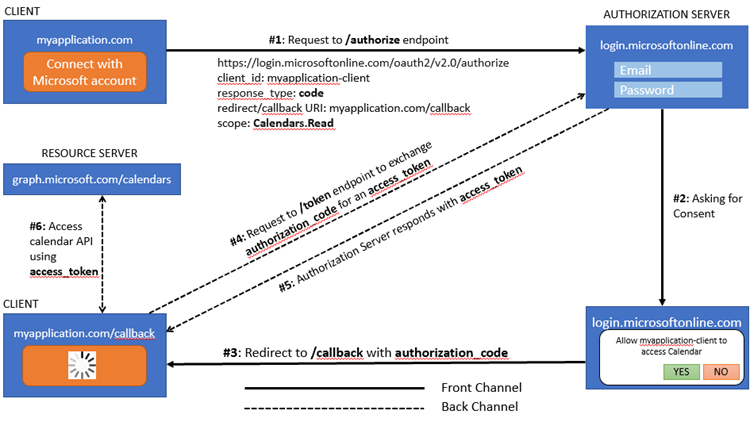
For this post, I am considering Microsoft Identity Platform as the Identity Provider, this can be Auth0, Okta, Google, or even your own Identity Server implementation. The URLs and scopes are simplified for brevity.
|
|
| Authorization Code Flow |
GET: https://login.microsoftonline.com/<tenant>/oauth2/v2.0/authorize? &client_id=myapplication-client &response_type=code &redirect_uri=https://myapplication.com/callback &scope=Calendars.Read &state=some-state
https://myapplication.com/callback?state=some-state&code=eyJraWQiOiIzcG...
POST: https://login.microsoftonline.com/<tenant>/oauth2/v2.0/token content type application/x-www-form-urlencoded grant_type=authorization_code client_id=myapplication-client client_secret=<client_secret>
code=<code_received_from_authorize_endpoint>
{
"access_token": "eyJ0eXAiOiJKV1QiLCJhbGciOiJSUzI1NiIsImtpZCI...",
"token_type": "Bearer",
"not_before": 1664733775,
"expires_in": 3600,
"expires_on": 1664737375,
"scope": "Calendars.Read"
}
A couple of important things to note here. In the picture above, note that the steps from #1 to #3 is happening on the Front channel, while the steps from #4 to #6 happen on the Back channel. The reason is, in step #3, a client_secret is involved and we shouldn't be exposing that to the outside.
Note: It is now recommended to use the Authorization Code with PKCE flow to provide better security even though a client is using a client_secret.
Hope this helps.
Happy Coding.
public class Person { public string FirstName { get; set; } public string LastName { get; set; } public DateOnly? DateOfBirth { get; set; } }
public class Person { public string FirstName { get; set; } public string LastName { get; set; } public DateOnly? DateOfBirth { get; set; } public Person(string firstName, string lastName) { FirstName = firstName; LastName = lastName; } }
public class Person { public required string FirstName { get; set; } public required string LastName { get; set; } public DateOnly? DateOfBirth { get; set; } }
Person person = new() { FirstName = "John", LastName = "Doe" };
Person person = new(); // Required member 'Person.FirstName' must be set in the object initializer or attribute constructor. // Required member 'Person.LastName' must be set in the object initializer or attribute constructor.
public class Person { public required string FirstName { get; set; } public required string LastName { get; set; } public DateOnly? DateOfBirth { get; set; } public Person(string firstName, string lastName) { FirstName = firstName; LastName = lastName; } }
Person person = new("John", "Doe"); // Above will throw a compile error
[SetsRequiredMembers] public Person(string firstName, string lastName) { FirstName = firstName; LastName = lastName; }
Person person = new("John", "Doe"); // Person is getting created using the constructor, but required DateOfBirth isn't being set // No compile errors here because [SetsRequiredMembers] is masking the error public class Person { public required string FirstName { get; set; } public required string LastName { get; set; } public required DateOnly DateOfBirth { get; set; } [SetsRequiredMembers] public Person(string firstName, string lastName) { FirstName = firstName; LastName = lastName; } }
Person person = new() { FirstName = "John", LastName = "Doe" }; public class Person { public required string FirstName { get; init; } public required string LastName { get; init; } public DateOnly? DateOfBirth { get; set; } }
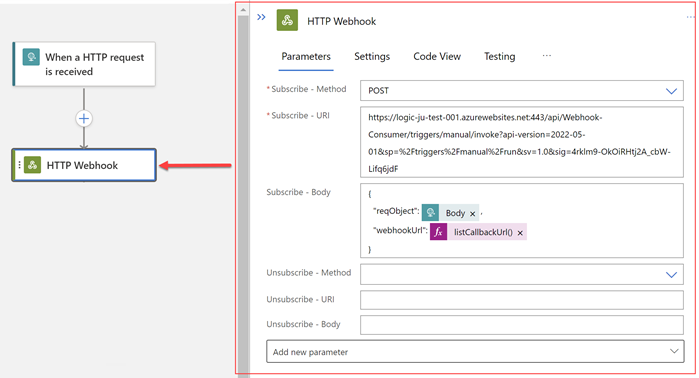
In this post, let's see how we can use a HTTP Webhook in an Azure Logic App to wait for an external event. Note: I am using Azure Logic App Standard model for the purpose of this post.
Imagine we have the following requirement.
|
|
| Consumer Workflow: When a HTTP request is received |
|
|
| Consumer Workflow: HTTP Action to call the Webhook |
{
"inputs": {
"method": "POST",
"uri": "@{triggerBody()?['webhookUrl']}",
"body": {
"messageFromWebhookConsumer": "Name formatting is completed",
"fullName": "@concat(triggerBody()?['reqObject']?['firstName'], ' ', triggerBody()?['reqObject']?['lastName'])"
}
}
}
{
"inputs": {
"subscribe": {
"method": "POST",
"uri": "https://logic-ju-test-001.azurewebsites.net:443/api/Webhook-Consumer/triggers/manual/invoke?api-version=2022-05-01&sp=%2Ftriggers%2Fmanual%2Frun&sv=1.0&sig=4rklm9-OkOiRHtj2A_cbW-Lifq6jd",
"body": {
"reqObject": "@triggerBody()",
"webhookUrl": "@listCallbackUrl()"
}
},
"unsubscribe": {}
}
}
|
|
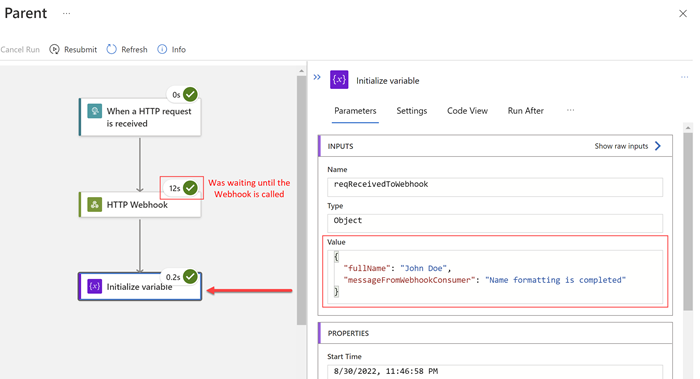
| Parent Workflow: Initialize variable |
{
"inputs": {
"variables": [
{
"name": "reqReceivedToWebhook",
"type": "object",
"value": "@body('HTTP_Webhook')"
}
]
}
}
And that's all about it.
|
|
| Parent Workflow: Run with payload |
|
|
| Parent Workflow: Running |
|
|
| Parent Workflow: Succeeded |
|
|
| Parent Workflow: Run Details |
Happy Coding.
Regards,
Jaliya