Showing posts with label Microsoft. Show all posts

Thursday, July 16, 2026

Received Microsoft MVP Award in Developer Technologies

I am humbled and honored once again to receive the precious Microsoft Most Valuable Professional (MVP) Award for the 13th consecutive year.

As always looking forward to another great year on top of Microsoft Development Stack.
Microsoft Most Valuable Professional (MVP)
Thank you Microsoft for your appreciation and Thank you everyone for your continuous support.

Happy Coding.

Regards,
Jaliya

Friday, July 11, 2025

Received Microsoft MVP Award in Developer Technologies

I am humbled and honored once again to receive the precious Microsoft Most Valuable Professional (MVP) Award for the 12th consecutive year.

As always looking forward to another great year on top of Microsoft Development Stack.
Microsoft Most Valuable Professional (MVP)
Thank you Microsoft for your appreciation and Thank you everyone for your continuous support.

Happy Coding.

Regards,
Jaliya

Thursday, July 11, 2024

Received Microsoft MVP Award in Developer Technologies

I am humbled and honored once again to receive the precious Microsoft Most Valuable Professional (MVP) Award for the 11th consecutive year.

As always looking forward to another great year on top of Microsoft Development Stack.
Microsoft Most Valuable Professional (MVP)
Thank you Microsoft for your appreciation and Thank you everyone for your continuous support.

Happy Coding.

Regards,
Jaliya

Friday, July 7, 2023

Received Microsoft MVP Award in Developer Technologies

I am humbled and honored once again to receive the precious Microsoft Most Valuable Professional (MVP) Award for the 10th consecutive year.

This year, the announcement of new MVPs took a bit longer (usually it's on 07/01), but finally got the email.

As always looking forward to another great year on top of Microsoft Development Stack.
Microsoft Most Valuable Professional (MVP)
Thank you Microsoft for your appreciation and Thank you everyone for your continuous support.

Happy Coding.

Regards,
Jaliya

Tuesday, July 5, 2022

Received Microsoft MVP Award in Developer Technologies

I am humbled and honored once again to receive the precious Microsoft Most Valuable Professional (MVP) Award for the ninth consecutive year.

This year, the announcement of new MVPs took a bit longer (usually it's on 07/01), but finally got the email.

As always looking forward to another great year on top of Microsoft Development Stack.
Microsoft Most Valuable Professional (MVP)
Thank you Microsoft for your appreciation and Thank you everyone for your continuous support.

Happy Coding.

Regards,
Jaliya

Thursday, July 1, 2021

Received Microsoft MVP Award in Developer Technologies

I am honored to receive the precious Microsoft Most Valuable Professional (MVP) Award for the eighth consecutive year.

As always looking forward to another great year on top of Microsoft Development Stack.
Microsoft Most Valuable Professional (MVP)
Thank you Microsoft for your appreciation and Thank you everyone for your continuous support.

Happy Coding.

Regards,
Jaliya

Wednesday, July 1, 2020

Received Microsoft MVP Award in Developer Technologies

 I am honored to receive the precious Microsoft Most Valuable Professional (MVP) Award for the seventh consecutive year.

As always looking forward to another great year on top of Microsoft Development Stack.
Microsoft Most Valuable Professional (MVP)
Thank you Microsoft for your appreciation and Thank you everyone for your continuous support.

Happy Coding.

Regards,
Jaliya

Thursday, November 14, 2019

Glance at Windows Terminal

I am late to the party but better late than never. I knew Windows Terminal was released a couple of months back, but I couldn't try it out myself until last night. My first impression was, it is amazing.

If you haven't had a look, I strongly suggest you should do it now. You can easily download the Windows Terminal from Microsoft Store, the Microsoft Store for Business, and GitHub. As of today, it's still in Pre-release mode, but still, it's working great.

It's a single tool and you can open up multiple tabs, you don't have to navigate between multiple windows. And most importantly, you can have multiple profiles like PowerShell, CMD, WSL and you can just open them up in tabs. And each one of them can be customized using a single JSON file to suit your preferences.

This is how my Windows Terminal looks like.
Windows Terminal
That looks wonderful, right!

And when you click on Settings, there is a whole bunch of customizations you can do through the profiles.json file. I have a bit of customization done, like below.
{
  "$schema": "https://aka.ms/terminal-profiles-schema",
  "defaultProfile": "{61c54bbd-c2c6-5271-96e7-009a87ff44bf}",
  "profiles": [
    {
      // Make changes here to the powershell.exe profile
      "guid": "{61c54bbd-c2c6-5271-96e7-009a87ff44bf}",
      "name": "Windows PowerShell",
      "commandline": "powershell.exe",
      "hidden": false,
      "fontSize": 10,
      "useAcrylic": true,
      "acrylicOpacity": 0.7
    },
    {
      // Make changes here to the cmd.exe profile
      "guid": "{0caa0dad-35be-5f56-a8ff-afceeeaa6101}",
      "name": "cmd",
      "commandline": "cmd.exe",
      "hidden": false,
      "fontSize": 10,
      "useAcrylic": true,
      "acrylicOpacity": 0.7
    },
    {
      "guid": "{6e9fa4d2-a4aa-562d-b1fa-0789dc1f83d7}",
      "hidden": false,
      "name": "Legacy",
      "source": "Windows.Terminal.Wsl",
      "fontSize": 10,
      "useAcrylic": true,
      "acrylicOpacity": 0.7
    },
    {
      "guid": "{b453ae62-4e3d-5e58-b989-0a998ec441b8}",
      "hidden": false,
      "name": "Azure Cloud Shell",
      "source": "Windows.Terminal.Azure",
      "fontSize": 10,
      "useAcrylic": true,
      "acrylicOpacity": 0.7
    }
  ],
  "schemes": [],
  "keybindings": [],
  "initialCols": 160,
  "initialRows": 40
}

To view the default settings, hold "alt" while clicking on the "Settings" button. And for documentation on these settings, see: check out Windows Terminal User Documentation.

This is wonderful!

Happy Coding.

Regards,
Jaliya

Tuesday, July 2, 2019

Received Microsoft MVP Award in Developer Technologies

I am honored to receive the precious Microsoft Most Valuable Professional (MVP) Award for the sixth consecutive year.

As always looking forward to another great year on top of Microsoft Development Stack.
MVPLogo_thumb[2]
Microsoft Most Valuable Professional (MVP)
Thank you Microsoft for your appreciation and Thank you everyone for your continuous support.

Happy Coding.

Regards,
Jaliya

Wednesday, May 10, 2017

Windows Subsystem for Linux

With Windows 10 Creators Update one of the features that got released publicly is Windows Subsystem for Linux (WSL). But it was available for Windows 10 Insiders for almost like a year now and was initially announced at Build 2016. WSL basically let’s you run Linux on Windows. If you are thinking about a VM, No, it’s not a Virtual Machine.

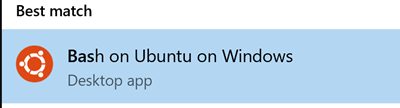
Configuring WSL on Windows shouldn’t take more than 10 minutes, by following these steps you can configure WSL pretty easily. Once you have configured WSL, you should be able use Bash on Ubuntu, just by opening up the Command Prompt/PowerShell and running bash command.
image
WSL
Or you can Search for Bash in Windows, and there should be a desktop app named Bash on Ubuntu on Windows.
image
Bash On Ubuntu On Windows
Currently under WSL only Ubuntu is supported, may be in the future Microsoft might support different flavors of Linux.

On WSL, one of the things that fascinates me more is the File System that is already mounted for you.
image
File System
And through the bash I can just run mkdir and the folder will be appearing inside Windows Explorer the same time.

And most importantly I can run .NET Core Apps on WSL. I have installed .NET Core on my WSL, (again it’s pretty easy, just follow the relevant steps described here) and created an ASP.NET Core HelloWorld application.
image
.NET Core on WSL
And I can just browse the site from a Web Browser in my Windows OS. Isn’t that just great?

Happy Coding.

Regards,
Jaliya

Friday, March 31, 2017

Why I love Visual Studio Code

I just love Visual Studio Code and believe most of you must be feeling the same. On my code editor preferences, VS Code only seconds to Visual Studio.

In this post, thought of sharing some little tiny things that altogether makes VS Code a great editor. Let’s just start by creating a folder.

Quick Open

First I can just right click on the folder and open with VS Code. (I know it’s an old feature, but it’s super useful.)
SNAGHTML1ed23e5
Open with Code
This is one of my most favorite features. Once the VS Code is opened, I can open up a Integrated Terminal. That’s either by Menu Bar -> View -> Integrated Terminal or just by Ctrl+`.
image
Integrated Terminal
In Windows environment, you can use either PowerShell or cmd. (On the above image, I have customized the Integrated Terminal to use cmd, but PowerShell is the default. Will show you how easy it is to customize the VS Code to match your preference later in the post.)
image
Integrated Terminal
If you are worried about the command I typed here, I just created a React-Redux project using dotnet. Basically you can type any command which you do on cmd.

image
IntelliSense
You have fully IntelliSense support for most of the languages, here I am writing TypeScript code.

Keyboard Shortcuts

If you are so much addicted to the keyboard and hate using the mouse, there are plenty of shortcuts to do most of VS Code tasks without leaving the keyboard. Not to forget, all the keyboard shortcuts can be customized.

Here is a list of keyboard shortcuts available in VS Code.
Key Bindings for Visual Studio Code

But in default VS Code you might find some keyboard shortcuts are different when compared to Visual Studio. But don’t worry, there is an extension called Visual Studio Keymap to port all your Visual Studio shortcuts to VS Code.

There are hundreds of extensions available providing variety of features, here is a list of some extensions that I have installed.
image
Installed Extensions
VS Code lets you customize variety of options to suit your preference.
image
Customize
If you open up the Settings, you will see something like this.
image
Settings
Here on the left side you can see all the different settings that you can change. On the right side, it will either display User Settings or Workspace Settings. While User Settings are maintained in “C:\Users\{UserName}\AppData\Roaming\Code\User\settings.json”, Workspace Settings are maintained in “{CurrentExplorerFolder}\.vscode\settings.json”. Whatever the settings declared in those files will get applied in following order. Default Settings will get overridden by User Settings, and both Default and User Settings will get overridden by Workspace Settings.

Here is how I have customized my VS Code. The highlighted properties are for customizing the Integrated Terminal which I mentioned earlier in the post.
image
Customized Settings
Same way we can customize the keyboard shortcuts. User specific shortcuts will get stored in “C:\Users\{UserName}\AppData\Roaming\Code\User\keybindings.json”.

Well, these are some of the features that I love. If I started to write them all, I won’t be able to stop.

Happy Coding.

Regards,
Jaliya

Monday, January 2, 2017

Received Microsoft MVP Award in Visual Studio and Development Technologies

It’s always one of the nicest feelings to start writing the first blog post of the new year with this one. I am humbled, pleased and honored to receive the precious Microsoft Most Valuable Professional (MVP) Award for the fourth consecutive year. Like last year got the award under Visual Studio and Development Technologies. In the first two years, I have been awarded MVP for Visual C# and then .NET.

As always looking forward for another busy year on top of Microsoft Development Stack.
MVPLogo_thumb[2]
Microsoft Most Valuable Professional (MVP)
Thank you Microsoft for your appreciation and Thank you Fiqri Ismail, Wellington Perera, Chaminda Chandrasekara and all the people for your continuous support.

Happy Coding.

Regards,
Jaliya

Sunday, January 3, 2016

Received Microsoft MVP Award in Visual Studio and Development Technologies

Received the precious Microsoft Most Valuable Professional (MVP) Award for the third consecutive year. And this time in Visual Studio and Development Technologies. In the last two years, I have been awarded MVP for Visual C# and then .NET.

Looking forward for a year filled with action on top of Microsoft Development Stack.
MVPLogo_thumb[2]
Microsoft Most Valuable Professional (MVP)
Thank you Microsoft for your appreciation and Thank you Fiqri Ismail, Wellington Perera, Chaminda Chandrasekara and all the people for your continuous support.

Happy Coding.

Regards,
Jaliya

Sunday, August 30, 2015

Received Microsoft Community Contributor (MCC) Badge for the First Time!

Today I just noticed that I have received the Microsoft Community Contributor (MCC) badge for the first time and Thank you Microsoft!
2015-08-31_12-38-24
Microsoft Community Contributor
And if you want to become one, read the following to know how.

MICROSOFT COMMUNITY CONTRIBUTOR (MCC)

PROCESS: Microsoft automatically reviews the contributions of participants who offer their time and energy to online technical communities such as Microsoft Answers/Community, MSDN, and TechNet to identify those who make notable contributions for possible recognition as a Microsoft Community Contributor. Microsoft employees cannot become MCCs, but MVPs can become MCCs. MCC is an automatic reward (nobody can help you win it by nominating you). 

REWARD: The reward is a "small benefit": the award status in your profile on the online community (MSDN, TechNet, etc.) and your name on a list of MCC award recipients. The MCC badge ends after ninety days (three months) from the date found within the welcome email.

Tips to becoming an MCC (based on the FAQ)
1) Make an impact in the community, using tools like TechNet and MSDN Forums. Maintain quality and quantity in your contributions.
2) Rule the Forums. Find a technology's forum (on MSDN or TechNet) where there's a huge need for moderation and answerers. Become an expert in that technology. Then answer a ton of questions with quality answers, propose a lot of answers (especially ones that aren't from you), and then request to be made an Answerer or Moderator. See How to Become an MSDN or TechNet Forum Moderator. Try to get a lot of quality answers completed.
NOTE: This award is based on your contributions in the last 3 months. In other words, if you just started one week ago, you'll need to continue your efforts for a few more months.
NOTE: MCC is an automatic reward (nobody can help you win it by nominating you).

For more information,

Happy Coding.

Regards,
Jaliya

Thursday, April 30, 2015

Register to attend the Microsoft MVP Virtual Conference

Hi All – I wanted to let you know about a great free event that Microsoft and the MVPs are putting on, May 14th & 15th.  Join Microsoft MVPs from the Americas’ region as they share their knowledge and real-world expertise during a free event, the MVP Virtual Conference.

The MVP Virtual Conference will showcase 95 sessions of content for IT Pros, Developers and Consumer experts designed to help you navigate life in a mobile-first, cloud-first world.  Microsoft’s Corporate Vice President of Developer Platform, Steve Guggenheimer, will be on hand to deliver the opening Key Note Address.

Why attend MVP V-Conf? The conference will have 5 tracks, IT Pro English, Dev English, Consumer English, Portuguese mixed sessions & Spanish mixed sessions, there is something for everyone! Learn from the best and brightest MVPs in the tech world today and develop some great skills!

Be sure to register quickly to hold your spot and tell your friends & colleagues.

The conference will be widely covered on social media, you can join the conversation by following @MVPAward and using the hashtag #MVPvConf.

Register now and feel the power of community!
Register
Register
Happy Coding.

Regards,
Jaliya

Friday, March 20, 2015

Visual C# Technical Guru - February 2015

All the votes are in for Microsoft TechNet Guru Awards - February 2015. And for Februarys’ competition, I didn’t participate as a Wiki article author. Instead I have got this privilege of becoming  a judge under Visual C# category.

The TechNet Guru Awards celebrate the technical articles on Microsoft TechNet.

Post in WikiNinjas Official Blog,


image
Visual C# Technical Guru - February 2015
Happy Coding.

Regards,
Jaliya

TNWikiSummit15 Day 2 Presentation: Working with WCF Data Services

Yesterday was a very special day to me, as I did my first ever live online session, and most importantly that’s in one of the biggest events in TechNet Wiki history, the TechNet Wiki Summit 2015.

I am sure, you must have participated at least to one session there. There was a great line up of interesting sessions which was delivered by amazing group of speakers, community leaders, and experts from different countries.

So here is a summary of my session “Working with WCF Data Services”.

image
Working with WCF Data Services

I have started off with the session showing the Wiki article which my session was based upon. Then I gave a quick snap of what I was planning to deliver in the session.


image
Agenda

Then I moved ahead following my agenda. Here I have spent some considerable amount of time explaining OData, as it’s the concept behind WCF Data Services. First, I briefly explained what OData is and explained the problem Microsoft tried to resolve by introducing OData. After that, I explained the solution which OData provides as a answer to that particular problem.

Now it was the first demo time. For that I opened up Internet Explorer and showed the OData web site. There I went through OData Ecosystem, showing some Producers and Consumers and then opened up the Nuget Live Service in browser to demo the capabilities of OData Services. There I have used LINQPad to show how this handy tool can be used to run queries against OData Services.

After showing some cool queries against Nuget Live Service (well for me how they got executed is kind of cool!), moved back to the slides. After the demo, hoped the audience must have got some idea of OData. Then I have explained how OData really works. There I have briefly explained the four main parts of OData which are the OData Data Model, OData Protocol, OData Client Libraries and the OData service.

After explaining each of these in detail, now it’s high time to discuss about WCF Data Services. I started explaining what WCF Data Services really is and how it gets connected to OData. Then I explained  WCF Data Services data access layer. There I have gone through Entity Framework Provider, Reflection Provider and the Custom Provider.

Once I completed that, then again it’s demo time.

First I moved ahead with creating a WCF Data Service with Entity Framework Provider. Here I have created a ADO.NET Entity Data Model from Northwind database, and exposed it’s tables through my WCF Data Service. Then I have created an console application showing the different ways to create a GET request to retrieve some data.

After that, I started off with creating a WCF Data Service with Reflection Provider. There I have used a simple POCO class and created a method to retrieve some sample data. Then I have exposed those data through my WCF Data Service.

So that was it. It was almost the time for me to end my session!.

Here is a list of important links.

Links


Introduction to WCF Data Services

Slide Deck and Video : Available soon.

Finally there wasn’t many listeners as expected, but I am extremely privileged and honored to deliver a session in such an event.

Thank you Durva Ramos Junior, Ed Price, Microsoft and all the TechNet Wiki Ninja’s for all your support and if you want me to do a session in future, please do count me in.

Here is the link to the same article in TechNet Wiki Ninja's blog.
http://blogs.technet.com/b/wikininjas/archive/2015/03/19/tnwikisummit15-day-2-presentation-working-with-wcf-data-services.aspx

Happy Coding.

Regards,
Jaliya

Tuesday, March 17, 2015

Imagine Cup 2015 Sri Lanka

Had the pleasure of being a judge in first round of Imagine Cup 2015 Sri Lanka, under the “World Citizenship” category‏. Thank you Microsoft Sri Lanka for inviting me to be part of such an amazing experience.

There were around 51 teams from different universities in Sri Lanka as well as from leading schools. As this is the first round, most of the students were explaining their concepts. And amazingly some had demo applications developed as well.

I got really impressed with some concepts which the students presented, and of course, I got bored of some as well. I rather stop saying that, I hope the results of first round will be publicly available sometime during this week.

For those who will get to the next round, keep up the good work. For those who won’t, please don’t be discouraged. The more you fail, the more you succeed.

Happy Coding.

Regards,
Jaliya

Friday, January 2, 2015

Received Microsoft MVP Award for .NET

Kick starting the year 2015, received the Microsoft Most Valuable Professional (MVP) Award for the second consecutive year. Previous time it was awarded for the technical expertise Visual C#, but this time Microsoft has merged all previous technical expertise areas for .NET managed languages (Visual Basic, Visual C# and Visual F#) into one technical expertise area which is .NET. Under .NET technical expertise area, I will be focusing on Visual C#.

Feeling so great and I definitely will be keeping my contributions towards .NET technical community in every possible way.
MVPLogo
Microsoft Most Valuable Professional (MVP)
Thank you Microsoft and Katherine Chen for your appreciation and Thank you Fiqri Ismail, Wellington Perera, Chaminda Chandrasekara and all the people for your support.

Happy Coding.

Regards,
Jaliya

Thursday, December 18, 2014

Windows Phone and Windows Store Apps Technical Guru - November 2014

Became third in Windows Phone and Windows Store Apps Technical Guru Awards for the month of November, 2014. 

The TechNet Guru Awards celebrate the technical articles on Microsoft TechNet.

Post in WikiNinjas Official Blog,

Windows Phone and Windows Store Apps Technical Guru - November 2014
Happy Coding.

Regards,
Jaliya