I am humbled and honored once again to receive the precious Microsoft Most Valuable Professional (MVP) Award for the 11th consecutive year.
As always looking forward to another great year on top of Microsoft Development Stack.Thursday, July 11, 2024
Received Microsoft MVP Award in Developer Technologies
Tuesday, July 2, 2024
Azure DevOps Pipeline: Build and Deploy Azure Container App
In this post, let's see how we can build and deploy an Azure Container App from an Azure DevOps Pipeline.
Here for deployment, I am using az containerapp update.
trigger:
branches:
include:
- main
pool:
vmImage: ubuntu-latest
variables:
acrServiceConnection: <ACR_SERVICE_CONNECTION>
acrName: myacr.azurecr.io
imageRepositoryName: '<ACR_REPOSITORY_NAME>'
containerAppServiceConnection: '<CONTAINER_APP_SERVICE_CONNECTION>'
containerAppResourceGroup: '<CONTAINER_APP_RESOURCE_GROUP>'
containerAppName: '<CONTAINER_APP_NAME>'
name: $(Build.BuildId)
stages:
- stage: Build
displayName: Build
jobs:
- job: Build
displayName: Build Docker Image
steps:
- task: Docker@2
displayName: Build and push an image to container registry
inputs:
containerRegistry: '$(acrServiceConnection)'
repository: '$(imageRepositoryName)'
command: 'buildAndPush'
Dockerfile: '**/Dockerfile'
buildContext: './'
tags: '$(Build.BuildId)'
- stage: Deploy
displayName: Deploy
dependsOn:
- Build
condition: succeeded('Build')
jobs:
- deployment: Deployment
displayName: Deploy to Container App
# Requires an environment named 'Development'
environment: Development
strategy:
runOnce:
deploy:
steps:
- task: AzureCLI@2
displayName: Update Container App
inputs:
azureSubscription: '$(containerAppServiceConnection)'
scriptType: 'bash'
scriptLocation: 'inlineScript'
inlineScript: |
az containerapp update \
--name $(containerAppName) \
--resource-group $(containerAppResourceGroup) \
--image '$(acrName)/$(imageRepositoryName):$(Build.BuildId)' \
--set-env-vars \
'MongoDB__ConnectionString=<VALUE>' \
'ServiceBus__ConnectionString=<VALUE>' \
--min-replicas 1 \
--max-replicas 1
Azure DevOps already has an Azure Container Apps Deployment Task AzureContainerApps@1, which I haven't used, but do check it out.
Hope this helps.
Happy Coding.
Regards,
Jaliya
Thursday, June 20, 2024
.NET Isolated Azure Durable Functions: Support for Durable Entities with Netherite Storage Provider
Finally, Durable Entities are now supported with Netherite Storage Provider in .NET Isolated Azure Durable Functions.
While durabletask-netherite: 1.5.1 says it added support for isolated entities, unfortunately, it does not work (microsoft/durabletask-netherite/issues/390: System.NotSupportedException: Durable entities are not supported by the current backend configuration). We need Microsoft.Azure.Functions.Worker.Extensions.DurableTask.Netherite version 1.5.3 (at least) for this to work.
Now let's look at how to configure Netherite Storage Provider in a .NET Isolated Azure Durable Function.
First, we need to install the following package:
Microsoft.Azure.Functions.Worker.Extensions.DurableTask.Netherite >= 1.5.3.
Then we need to update the host.json as follows.
{
"version": "2.0",
"extensions": {
"durableTask": {
"storageProvider": {
"type": "Netherite"
}
}
},
"logging": {
...
}
}
And finally, for local development, we need to update the local.settings.json as follows.
{
"IsEncrypted": false,
"Values": {
"AzureWebJobsStorage": "UseDevelopmentStorage=true",
"EventHubsConnection": "SingleHost",
"FUNCTIONS_WORKER_RUNTIME": "dotnet-isolated"
}
}
You need to set up an Event Hubs namespace to run Netherite on Azure and I am not covering that in this post.
Now let's write a simple function to try out the Durable Entity functionality with Netherite.
I have the following simple CounterEntity.
using Microsoft.Azure.Functions.Worker;
using Microsoft.DurableTask.Entities;
using Microsoft.Extensions.Logging;
namespace AzureFunctionsDemo.Netherite;
public class CounterEntity : TaskEntity<int>
{
readonly ILogger logger;
public CounterEntity(ILogger<CounterEntity> logger)
{
this.logger = logger;
}
public void Add(int amount) => State += amount;
public void Reset() => State = 0;
public int Get() => State;
[Function(nameof(CounterEntity))]
public Task RunEntityAsync([EntityTrigger] TaskEntityDispatcher dispatcher)
{
return dispatcher.DispatchAsync(this);
}
}
And I am invoking CounterEntity through the following HTTP function that calls a Durable Function.
using Microsoft.Azure.Functions.Worker;
using Microsoft.Azure.Functions.Worker.Http;
using Microsoft.DurableTask;
using Microsoft.DurableTask.Client;
using Microsoft.DurableTask.Entities;
using Microsoft.Extensions.Logging;
namespace AzureFunctionsDemo.Netherite;
public static class Function1
{
[Function(nameof(HttpStart))]
public static async Task<HttpResponseData> HttpStart(
[HttpTrigger(AuthorizationLevel.Anonymous, "get", "post")] HttpRequestData req,
[DurableClient] DurableTaskClient client,
FunctionContext executionContext)
{
ILogger logger = executionContext.GetLogger(nameof(HttpStart));
string instanceId = await client.ScheduleNewOrchestrationInstanceAsync(nameof(EntityOrchestrator));
logger.LogInformation("Started orchestration with ID = '{instanceId}'.", instanceId);
return await client.CreateCheckStatusResponseAsync(req, instanceId);
}
[Function(nameof(EntityOrchestrator))]
public static async Task<int> EntityOrchestrator(
[OrchestrationTrigger] TaskOrchestrationContext context)
{
ILogger logger = context.CreateReplaySafeLogger(nameof(EntityOrchestrator));
var entityId = new EntityInstanceId(nameof(CounterEntity), "myCounter");
await context.Entities.CallEntityAsync(entityId, nameof(CounterEntity.Add), 10);
int currentValue = await context.Entities.CallEntityAsync<int>(entityId, nameof(CounterEntity.Get));
return currentValue;
}
}
After triggering the HTTP function, it will execute the Orchestration invoking the Durable Entity. Once the Orchestration is completed and when I check the Orchestration Status, I can see the current value of the CounterEntity.
|
|
| Orchestration Status |
Configure Durable Functions with the Netherite storage provider
Happy Coding.
Wednesday, June 19, 2024
.NET 8: Container Braking Change: Multi-platform Container Tags are Linux-only
The .NET 8 multi-platform container tags have been updated to be Linux-only. This means that the latest, <major>.<minor>, and <major>.<minor>.<patch> tags are Linux-only going forward.
Previously if we pull a .NET image with a multi-platform tag from a Windows machine, we would get a Windows image (if the tag supports the Windows platform), but not anymore.
For example: if we run the following in a pipeline using windows-latest agent, we will get an error.
FROM mcr.microsoft.com/dotnet/aspnet:8.0 AS base
# ...
FROM mcr.microsoft.com/dotnet/sdk:8.0 AS build
# ...
If we want to run it on a windows agent, then we need to explicitly update tag usage to indicate which Windows version we're targeting, something like the following.
FROM mcr.microsoft.com/dotnet/aspnet:8.0-nanoserver-ltsc2022 AS base
# ...
FROM mcr.microsoft.com/dotnet/sdk:8.0-nanoserver-ltsc2022 AS build
# ...
We can select a Windows image name based on our requirement: Windows Server Core vs Nanoserver.
Official announcement:
Multi-platform container tags are Linux-only
Hope this helps.
Happy Coding.
Regards,
Jaliya
Monday, June 17, 2024
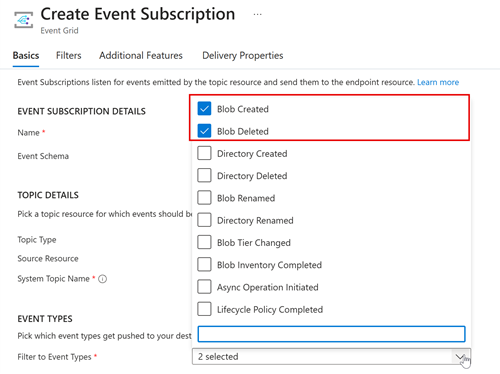
Webhook to Subscribe to Event Grid System Topics in Azure Storage Account
using Azure.Messaging.EventGrid;
using Azure.Messaging.EventGrid.SystemEvents;
using Microsoft.AspNetCore.Http;
using Microsoft.Azure.Functions.Worker;
using Microsoft.Azure.Functions.Worker.Http;
using Microsoft.Extensions.Logging;
using System.Net;
namespace FunctionApp1;
public class HttpFunction
{
private readonly ILogger<HttpFunction> _logger;
public HttpFunction(ILogger<HttpFunction> logger)
{
_logger = logger;
}
[Function(nameof(EventWebhook))]
public async Task<HttpResponseData> EventWebhook(
[HttpTrigger(AuthorizationLevel.Anonymous, "post", Route = null)] HttpRequestData req)
{
_logger.LogInformation("C# HTTP trigger function processed a request.");
using var memoryStream = new MemoryStream();
await req.Body.CopyToAsync(memoryStream);
EventGridEvent[] eventGridEvents = EventGridEvent.ParseMany(BinaryData.FromBytes(memoryStream.ToArray()));
foreach (EventGridEvent eventGridEvent in eventGridEvents)
{
// Handle system events
if (eventGridEvent.TryGetSystemEventData(out object eventData)
&& eventData is SubscriptionValidationEventData subscriptionValidationEventData)
{
// Do any additional validation (as required) and then return back ValidationCode
var responseContent = new
{
ValidationResponse = subscriptionValidationEventData.ValidationCode
};
HttpResponseData responseData = req.CreateResponse(HttpStatusCode.OK);
await responseData.WriteAsJsonAsync(responseContent);
return responseData;
}
}
// TODO: Handle custom events
return req.CreateResponse(HttpStatusCode.Accepted);
}
}
| Event Types |
| Web Hook Configuration |
| Event Subscription Deployed Successfully |
Friday, June 14, 2024
EF Core 8.0: Use of Arrays with Microsoft SQL Server
public record Post
{
public int Id { get; set; }
public string Title { get; set; }
public string[] Tags { get; set; }
public DateTime[] Visits { get; set; }
}
CREATE TABLE [Posts] (
[Id] int NOT NULL IDENTITY,
[Title] nvarchar(max) NOT NULL,
[Tags] nvarchar(max) NOT NULL,
[Visits] nvarchar(max) NOT NULL,
CONSTRAINT [PK_Posts] PRIMARY KEY ([Id])
);
|
|
| Table Data |
List<Post> postsWithTag = await context.Posts
.Where(x => x.Tags.Contains("Tag 1"))
.ToListAsync();
SELECT [p].[Id], [p].[Tags], [p].[Title], [p].[Visits]
FROM [Posts] AS [p]
WHERE N'Tag 1' IN (
SELECT [t].[value]
FROM OPENJSON([p].[Tags]) WITH ([value] nvarchar(max) '$') AS [t]
)
List<Post> postsVisitedToday = await context.Posts
.Where(x => x.Visits.Any(x => x.Date == DateTime.Now.Date))
.ToListAsync();
SELECT [p].[Id], [p].[Tags], [p].[Title], [p].[Visits]
FROM [Posts] AS [p]
WHERE EXISTS (
SELECT 1
FROM OPENJSON([p].[Visits]) WITH ([value] datetime2 '$') AS [v]
WHERE CONVERT(date, [v].[value]) = CONVERT(date, GETDATE())
)
Monday, May 27, 2024
.NET 9 and ASP.NET Core: Built-in Support for OpenAPI Document Generation
<Project Sdk="Microsoft.NET.Sdk.Web">
<PropertyGroup>
<TargetFramework>net9.0</TargetFramework>
<Nullable>enable</Nullable>
<ImplicitUsings>enable</ImplicitUsings>
</PropertyGroup>
<ItemGroup>
<PackageReference Include="Microsoft.AspNetCore.OpenApi" Version="9.0.0-preview.4.24267.6" />
</ItemGroup>
</Project>
WebApplicationBuilder builder = WebApplication.CreateBuilder(args);
builder.Services.AddOpenApi();
WebApplication app = builder.Build();
if (app.Environment.IsDevelopment())
{
app.MapOpenApi();
}
app.MapGet("/hello", () => "Hello world!")
.WithDescription("Returns Hello");
app.Run();
Wednesday, May 22, 2024
C# 13.0: params Improvements
<Project Sdk="Microsoft.NET.Sdk">
<PropertyGroup>
<OutputType>Exe</OutputType>
<TargetFramework>net9.0</TargetFramework>
<LangVersion>preview</LangVersion>
</PropertyGroup>
</Project>
void DoSomething(params string[] items)
{
// do something with items
}
DoSomething("apple", "orange"); // comma separated list
DoSomething(["apple", "orange"]); // array
DoSomething(); // empty, the length of the params list is zero
void DoSomething(params IEnumerable<string> items)
{
// do something with items
}
Tuesday, May 14, 2024
C# 12.0: .. Spread Element or Spread Operator
C# 12.0 introduced .. and its terminology is a bit confusing, some call it Spread Element and some call it Spread Operator.
Before going through the correct terminology, first, let's see what it does.
IEnumerable<string> sweetFruits = ["Apple", "Banana", "Mango", "Pineapple"];
IEnumerable<string> sourFruits = ["Orange", "Grapefruit", "Lemon", "Lime"];
IEnumerable<string> fruits = [.. sweetFruits, .. sourFruits];
// Output: Apple, Banana, Mango, Pineapple, Orange, Grapefruit, Lemon, Lime
Here .. is spreading the elements in a collection. We are spreading the sweetFruits and sourFruits, and then combining those to create fruits.
And we can use this feature in different ways.
For an example consider this.
IEnumerable<Employee> employees =
[
new Employee("John Doe", "Contract"),
new Employee("Jane Doe", "Permanent")
];
List<Employee> permanentEmployees = employees
.Where(e => e.Type == "Permanent")
.ToList();
We can use .. and filter permanentEmployees as follows and not do .ToList().
List<Employee> permanentEmployees =
[
.. employees.Where(e => e.Type == "Permanent")
];
Now what do we call it?
There is a nice explanation given in this post:
.NET Blog: Refactor your code with C# collection expressions
|
|
| Spread Element |
Jaliya
Wednesday, May 1, 2024
Visual Studio: New Durable Functions Project: System.InvalidOperationException: Synchronous operations are disallowed
[Function("Function1_HttpStart")]
public static async Task<HttpResponseData> HttpStart(
[HttpTrigger(AuthorizationLevel.Anonymous, "get", "post")] HttpRequestData req,
[DurableClient] DurableTaskClient client,
FunctionContext executionContext)
{
ILogger logger = executionContext.GetLogger("Function1_HttpStart");
// Function input comes from the request content.
string instanceId = await client.ScheduleNewOrchestrationInstanceAsync(
nameof(Function1));
logger.LogInformation("Started orchestration with ID = '{instanceId}'.", instanceId);
// Returns an HTTP 202 response with an instance management payload.
// See https://learn.microsoft.com/azure/azure-functions/durable/durable-functions-http-api#start-orchestration
return await client.CreateCheckStatusResponseAsync(req, instanceId);
}