Saturday, December 8, 2018

C# 8.0: Nullable Reference Types

Past week has been amazing, there were a lot of new announcements at Microsoft Connect(); 2018. Two of them are the first previews of both Visual Studio 2019 and .NET Core 3.0 (Visual Studio 16.0.0 Preview 1.0 and .NET Core 3.0.0 Preview 1).

And with these, we get the opportunity to try out some of the features which will be coming in C# 8.0. In this post, let’s go through Nullable Reference Types which is one of them.

Without explaining the feature, let’s consider the following code.
class Program
{
    static void Main(string[] args)
    {
        Employee employee = null;
        Console.WriteLine(employee.Name);
    }
}
 
class Employee
{
    public string Name { get; set; }
}
The code is pretty obvious, you can see that when the employee is null, trying to access its property Name will throw a NullReferenceException.

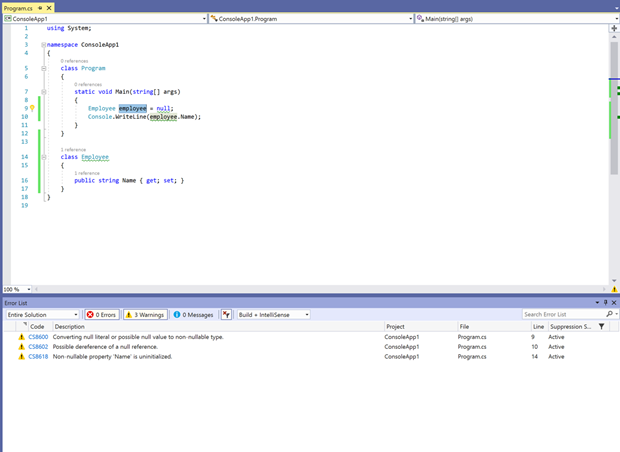
Now closely look at the following two pictures. First one is when we are on C# 7.3 (Visual Studio 15.9.3) and the second one is when we are on C# 8.0 (Visual Studio 16.0.0 Preview 1.0). If you are wondering how to select language version in Visual Studio, check out this post. 
image
C# 7.3 (Visual Studio 15.9.3)
image
C# 8.0 (Visual Studio 16.0.0 Preview 1.0)
I am sure you can spot the difference. Visual Studio is not issueing any warnings in the first picture, but in the second, Visual Studio is issuing a couple of warnings.

This is because C# 8.0 is introducing nullable reference types and non-nullable reference types. So starting with C# 8.0, all the reference type variables are not nullable and if the compiler sees a code trying to dereference a non-nullable reference type, it will issue a warning. But as of now, you are opted-out for this feature by default. You can opt-in to this feature (which is known as nullable contexts) using the following two approaches.
  • Project Wide:
This is by adding the following line to the .csproj file right after the LanguageVersion.
<NullableReferenceTypes>true</NullableReferenceTypes>
  • Using a newly introduced pragma, #nullable.
#nullable enable
#nullable disable
I am using project-wide setting for the post here.

Now if we have a look at the warnings Visual Studio complains about, it has three warnings.

CS8600: Converting null literal or possible null value to non-nullable type.

This is because our the variable employee of type Employee is no longer nullable. If we expect the variable to be nullable, we can change the variable initialization as follows (just as we will do for values types).
Employee? employee = null;
And prior to C# 8.0 this wasn’t possible.

CS8602: Possible dereference of a null reference.

Since our employee variable can be null, we need to update the code to add null conditional operator which got introduced with C# 6.
Console.WriteLine(employee?.Name);
CS8618: Non-nullable property 'Name' is uninitialized.

This is a nice one. Name property of Employee is a type of string and string is a reference type. Now in our sample, employee is null meaning that a value for Name is not set. To fix this we can update the code as follows.
public string? Name { get; set; }
And again this wasn’t possible prior to C# 8.0.

null-forgiving operator (!.)

This is another feature which is part of nullable reference types. Consider the below code.
class Program
{
    static void Main(string[] args)
    {
        Employee? employee = null;
        // some code
        Console.WriteLine(employee.Name);
    }
}
 
class Employee
{
    public string? Name { get; set; }
}
This will again issue us “CS8602: Possible dereference of a null reference”. If we know employee is not going to be null because of some code, we can override the warning by updating the code as below.
Console.WriteLine(employee!.Name);
I am sure nullable reference types will tremendously help us in writing quality code.

Happy Coding.

Regards,
Jaliya

Wednesday, November 28, 2018

Visual C# and ASP.NET Technical Guru - October 2018

Another month as a judge in Microsoft TechNet Guru Awards. And this it’s under both Visual C# and ASP.NET category. The TechNet Guru Awards celebrate the technical articles on Microsoft TechNet.

Post in WikiNinjas Official Blog,
image
]Visual C# Technical Guru - October 2018
Well, this time under Visual C# there were not many articles as it was used to be. Got into judging ASP.NET Category as well.
image
ASP.NET Technical Guru - October 2018
Happy Coding.

Regards,
Jaliya

Sunday, November 25, 2018

Visual Studio 2017 Version 15.9 and .NET Core Tooling

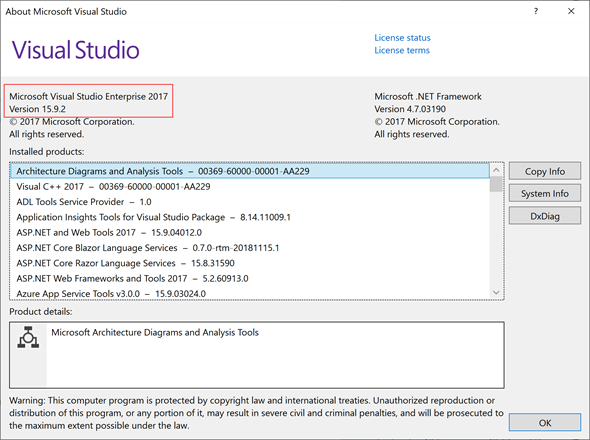
A couple of days back Visual Studio 2017 Version 15.9 was released and it is the final minor update to Visual Studio 2017. As of now, 2 service updates have been already released and currently, it’s on 15.9.2.
image
Visual Studio About
One of the major features released with Visual Studio 15.9 is an update to how Visual Studio Tools for .NET Core determines the version to .NET Core SDK to use with.

Prior versions were using whatever the latest .NET Core SDK installed in your machine, meaning that even if you have installed a preview version of .NET Core SDK, a stable version of Visual Studio was using that preview version.

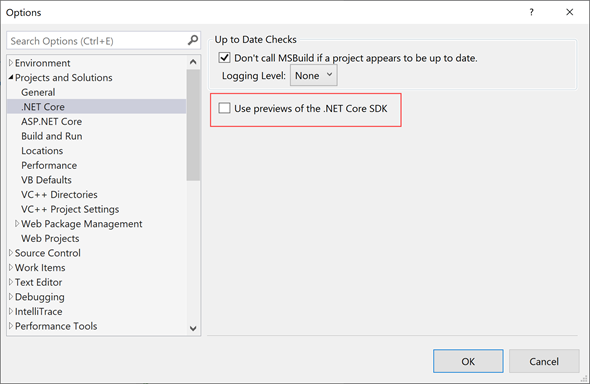
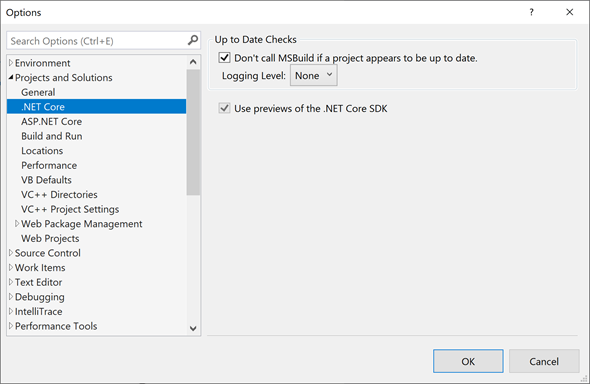
So starting from Visual Studio 15.9, it will be defaulted to use the latest stable .NET Core SDK installed in your machine. But you can always choose to opt-in to use the preview versions of .NET Core SDK in Visual Studio by going to Tools->Options->Projects and Solutions->.NET Core and selecting Use previews of the .NET Core SDK.
image
.NET Core Options
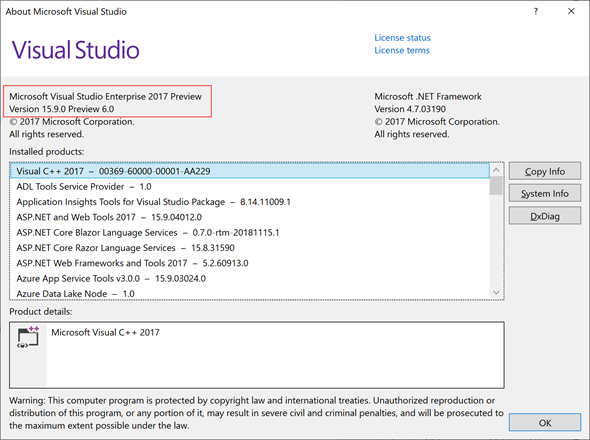
I also have the latest preview version of Visual Studio 2017 installed which is Version 15.9.0 Preview 6.0 as of now.
image
Visual Studio About
But in the preview versions, I can’t opt out from using the preview versions of .NET Core SDK.
image
.NET Core Options
The option is disabled and the reason is, for Visual Studio to work properly, it needs the preview versions.

Hope this helps.

Happy Coding.

Regards,
Jaliya

Wednesday, November 21, 2018

Wrote a post on Wiki Life at Official Blog of TechNet Wiki

Wrote a post in Wiki Ninjas - Official Blog of TechNet Wiki. The title of the post is TNWiki Article Spotlight - Blazor: CRUD Using MongoDB.
image
TNWiki Article Spotlight - Blazor: CRUD Using MongoDB

Happy Coding.

Regards,
Jaliya

Sunday, November 18, 2018

ASP.NET Core: Important Things to Consider When Configuring Cookie Authentication

In this post, let’s go through two of the important things to consider when configuring Cookie Authentication in an ASP.NET Core Application.
services
     .AddAuthentication(CookieAuthenticationDefaults.AuthenticationScheme)
     .AddCookie(CookieAuthenticationDefaults.AuthenticationScheme, x =>
     {
          // other configuration
          x.Cookie.SecurePolicy = CookieSecurePolicy.SameAsRequest;
          x.Cookie.SameSite = SameSiteMode.None;
     })
Cookie.SecurePolicy and Cookie.SameSite plays a major role in Cookie authentication.

Cookie.SecurePolicy

This is an enum of type CookieSecurePolicy.
  • SameAsRequest: This is the default. If the server has provided the cookie to the client over HTTP, then all subsequent HTTP and HTTPS requests can return the cookie to the server. If it was over HTTPS, only HTTPS requests can take the cookie back.
  • Always: When this is set, your cookie will only sent in HTTPS requests.
  • None: When this is set, even the cookie is sent to the client in HTTPS, all your HTTP and HTTPS requests can take the cookie back to the server.

Cookie.SameSite

This is an enum of type SameSiteMode. This specifies how the cookie will be sent in cross-site requests.
  • None: No mode is specified.
  • Lax: The cookie will be sent with "same-site" requests, and with "cross-site" top-level navigation.
  • Strict: When the value is Strict, or if the value is invalid, the cookie will only be sent along with "same-site" requests.
An important thing to note is, the Cookie Policy Middleware setting for MinimumSameSitePolicy will override your setting of Cookie.SameSite as the matrix below. (Reference: Cookie Policy Middleware)
image
Matrix
Hope this helps.

Happy Coding.

Regards,
Jaliya

Friday, November 2, 2018

Visual C# Technical Guru - September 2018

Another month as a judge in Microsoft TechNet Guru Awards under Visual C# category. The TechNet Guru Awards celebrate the technical articles on Microsoft TechNet.

Post in WikiNinjas Official Blog,
https://blogs.technet.microsoft.com/wikininjas/2018/11/01/technet-guru-awards-september-2018/

image
Visual C# Technical Guru - September 2018
Happy Coding.

Regards,
Jaliya

Sunday, October 28, 2018

ASP.NET Core In-Memory Caching

In this post let’s go through how server-side caching can be used in an ASP.NET Core Application, specially in-memory caching.

Caching can be used to improve the performance of an application. For an example, say that you have an API endpoint and there, you are returning some data after querying a database, and you are sure the related data is not going to get refreshed for a certain period of time, maybe daily. In that case, there is no point of querying the database each time your endpoint is being called within that day. So in the initial call, you can query the database, cache them and for the next subsequent calls, you can return the data from the cache. Then after that certain period of time expires, elicit the data in the cache and start from the beginning.

The in-memory caching uses web servers memory to store the cache. So now an interesting question comes, what if the application is running on multiple servers then how can the cache is shared. In such scenario, either we will need to enforce sticky sessions (specific session and all its subsequent sessions being directed to the same server) or distributed caching (doesn't use local memory and uses some other providers to maintain the cache Microsoft SQL Server, Redis etc.). In this post, we are assuming sticky sessions are in place.

ASP.NET Core provides 2 options.
public class MemoryCache : IDisposable, Microsoft.Extensions.Caching.Memory.IMemoryCache
This one is the preferred in the world of ASP.NET Core, as you can see it implements IMemoryCache and nicely integrated to ASP.NET Core DI.
public class MemoryCache : System.Runtime.Caching.ObjectCache, IDisposable
This one comes for .NET Framework, but still as long you target .NET Standard 2.0 or above, you can use this.

Now let’s see how we can use in-memory caching using Microsoft.Extensions.Caching.Memory.MemoryCache.

I have created an ASP.NET Core Web API application using the default template.

First, you need to register IMemoryCache. We don’t explicitly need to register, there is an extension method already available.
public void ConfigureServices(IServiceCollection services)
{
    services.AddMvc().SetCompatibilityVersion(CompatibilityVersion.Version_2_1);
 
    services.AddMemoryCache();
}
Next, in the controllers’ constructor, I can inject IMemoryCache.
public IMemoryCache _memoryCache { get; }
 
public ValuesController(IMemoryCache memoryCache)
{
    _memoryCache = memoryCache;
}
And use as follows.
[HttpGet]
public ActionResult<IEnumerable<string>> Get()
{
    string key = "Somekey";
 
    if (!_memoryCache.TryGetValue(key, out DateTime cacheValue))
    {
        cacheValue = DateTime.Now;
 
        var cacheEntryOptions = new MemoryCacheEntryOptions()
            .SetSlidingExpiration(TimeSpan.FromSeconds(30));
 
        _memoryCache.Set(key, cacheValue, cacheEntryOptions);
    }
 
    return new string[] { $"Cached: { cacheValue.ToString()}", $"Actual: { DateTime.Now.ToString()}" };
}
The cache contains EntriesCollection which is maintained using keys. The logic is simple, we are adding items to EntriesCollection identified by a key, and when we add we can set a variety of options (MemoryCacheEntryOptions).

  • AbsoluteExpiration
Gets or sets an absolute expiration date for the cache entry.
  • AbsoluteExpirationRelativeToNow
Gets or sets an absolute expiration time, relative to now.
  • ExpirationTokens
Gets the IChangeToken instances which cause the cache entry to expire.
  • PostEvictionCallbacks
Gets or sets the callbacks will be fired after the cache entry is evicted from the cache.
  • Priority
Gets or sets the priority for keeping the cache entry in the cache during a memory pressure triggered cleanup. The default is Normal.
  • Size
Gets or sets the size of the cache entry value.
  • SlidingExpiration    
Gets or sets how long a cache entry can be inactive (e.g. not accessed) before it will be removed. This will not extend the entry lifetime beyond the absolute expiration (if set).

More reading,
Cache in-memory in ASP.NET Core

Hope this helps.

Happy Coding.

Regards,
Jaliya

Thursday, October 11, 2018

.NET Core on MacOS: Code Coverage with Coverlet

I wanted to check the code coverage on a .NET Core project I am working on. But I am on MacOS, and unfortunately, Visual Studio for Mac nor JetBrains Rider (on MacOS) does not support code coverage as of today. JetBrains is going to port dotCover to be cross-platform so we will have Rider + dotCover in near future which is something to look forward to.

I found this brilliant tool coverlet developed by Toni Solarin-Sodara. Coverlet is a cross-platform code coverage library for .NET Core, with support for line, branch and method coverage. I just gave it a try now, it looks amazing and with very little steps, I can get the code coverage.

First I need to add the coverlet.msbuild nuget package to the unit test project.
# From the folder which contains UnitTests.csproj file
dotnet add package coverlet.msbuild

# If the folder contains multiple .csproj files, specify the targetted .csproj file
dotnet add <MyProject.UnitTests.csproj> package coverlet.msbuild
Then I can just run,
dotnet test <MyProject.UnitTests.csproj> /p:CollectCoverage=true
But for some reason, I was getting this error "...coverlet.msbuild.targets: error: Failed to resolve assembly:...". After a little bit of googling, found this issue where it says to run dotnet test command with /p:CopyLocalLockFileAssemblies=true flag.
dotnet test <MyProject.UnitTests.csproj> /p:CollectCoverage=true /p:CopyLocalLockFileAssemblies=true
And yes, that did it and I am presented with most awaited code coverage.

Code Coverage
There are a lot of options that you can configure with coverlet and you should definitely try it.

Hope this helps.

Happy Coding.

Regards,
Jaliya
Tuesday, October 2, 2018

ASP.NET Core: Setting Up HTTPS Local Development Certificate in MacOS

In this post let’s see how we can configure local HTTPS certificate in MacOS for an ASP.NET Core web application.

You can use dotnet-dev-cert which is a command line tool to generate certificates used in ASP.NET Core during local development. To install the tool, you can simply run the following command (note: the version can be different, it's the version as of today).
dotnet tool install --global dotnet-dev-certs --version 2.1.1 
Once installed, you can generate a certificate just by running the below command.
dotnet dev-certs https -ep localhost.pfx -p dev
image
dotnet dev-certs
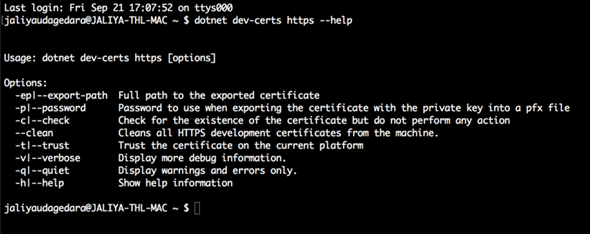
You can run the command with --help flag to see more options about the tool.
dotnet dev-certs https --help

image
dotnet dev-certs https --help
Once the certificate is generated, you should be able to see the certificate in Keychain Access. You can easily open Keychain Access by using Spotlight or, navigating to Applications -> Utilities -> Keychain Access.

image
Keychain Access
Now you need to trust the certificate for SSL by double-clicking on the certificate, expanding Trust and selecting Always Trust in Secure Socket Layter (SSL) dropdown.
image
Keychain Access
Hope this helps.

Happy Coding.

Regards,
Jaliya

Monday, October 1, 2018

Visual C# Technical Guru - August 2018

Another month as a judge in Microsoft TechNet Guru Awards under Visual C# category. The TechNet Guru Awards celebrate the technical articles on Microsoft TechNet.

Post in WikiNinjas Official Blog,
https://blogs.technet.microsoft.com/wikininjas/2018/09/30/technet-guru-competition-winners-august-2018/

Visual C# Technical Guru - August 2018
Happy Coding.

Regards,
Jaliya