Thursday, March 29, 2012

What's new in C# 5.0

As some of you might already know the beta release of Visual Studio version 11 which includes the C# version 5, Visual Basic version 11 and .NET CLR version 4.5 is available for download now.

On this week's MVP Mondays series Fahao Tang, one of the Visual C# MVPs' in the community has published this nice little article on Introduction of New Features in C# 5.0. Thought to share it with you all and add something along which I have learned while experiencing the beauty of Visual Studio Async CTP.

In C# 5.0 there are two main new key features,
  1. Async Programming
  2. Caller Information
01. Async Programming

Microsoft has introduced this Async Programming or Asynchronous Programming with two keywords. One is async modifier and the other is await operator. With this new approach, asynchronous and concurrent programming will be much easier and the code would be easier to write, easier to understand and maintain.

async

The async modifier indicates the compiler that a method or a lambda expression is asynchronous. A method that is marked with the async modifier is referred to as an async method. An async method typically contains one or more occurrences of the await operator, but the absence of an operator does not cause a compiler error. Instead the compiler issues a warning for such methods. If an async method doesn’t use the await operator, the method will not be suspended and will be executing as a synchronous method, despite the async modifier.

Important thing to note with async methods is, an async method can have only following return types : void, Task and Task(Of TResult).
private async void btnStart_Click(object sender, RoutedEventArgs e)
await

Inside an async method, the await operator is applied to a task to suspend execution of the method until the task is completed (which means await requires a task (using System.Threading.Tasks) to await on). In the meantime, control is returned to the caller of the method. The suspension is accomplished without exiting the async method, and it does not cause finally blocks to run. 

The things to note here is if we use try catch block, try catch block is capable of handling any exception occurring in caller or in the async method without any extra work.

To take the concept clearly let's take a look at the following code.
private void btnStart_Click(object sender, RoutedEventArgs e)
{   
    //call one
    var result = GetContent("http://msdn.microsoft.com/");
    //call two
    var result = GetContentAsync("http://msdn.microsoft.com/");               

    //some code here
}
private string GetContent(string address)
{   
    try
    {
        string result = new WebClient().DownloadString(address);
        return result;
    }
    catch (Exception ex)
    {
        throw;
    }
}
The above button click event would be a general button click event where the whole code will be executing line by line. When the event get fired our code will call the GetContent method and will download the all the html content in "http://msdn.microsoft.com/" as a string and it will get stored in the string variable result and it will be returned to the caller. Then we can do what ever we want to do with that. The core point in the above way is, the execution of line "//some code here" will hold until the download completes. In that time if you try to move your application across your desktop or if you click on your application you will see that your application gets unresponsive.

For that here comes async and await. You can mark your method async and you can change the DownloadString to it's asynchronous type which is DownloadStringTaskAsync. Now since await always requires a task to await on and DownloadStringTaskAsync will return a task you can easily put await and modify the code like this.Now what will happen is, when the event get fired our code will call the GetContent method and will download the all the html content in "http://msdn.microsoft.com/" in the background while executing next lines continuously which are in "//some code here". So when you move your application across your desktop or if you click on your application there will be no hang outs or unresponsive messages.
private async Task<string> GetContentAsync(string address)
{   
    try
    {
        return await new WebClient().DownloadStringTaskAsync(address);
    }
    catch (Exception ex)
    {
        throw;
    }
}
02. Caller Information

Using this new feature we will be able obtain information about the caller of a method. This is possible via Caller Info attributes, using that we can identify the file path of the caller's source code, the line number in the caller's source code, and the member name of the caller. This information is helpful for tracing, debugging, and creating diagnostic tools.


For more information,
     What's New for Visual C# in Visual Studio 11 Beta

Happy Coding.

Regards,
Jaliya

Tuesday, March 27, 2012

Who really is this farm account in SharePoint 2010

If you have been working with SharePoint and if you are reading articles related to SharePoint, this word, "Farm Account" appears a lot in them and definitely you should be familiar with it. But I am pretty sure you must be wondering where you are defining this farm account at the first place in SharePoint. Is it your domain Administrator or someone else.

This is the place where you define the farm account for your SharePoint 2010.

Specify Configuration Database Settings

Even though the SharePoint 2010 Product Configuration Wizard asks you to specify a user as a database access account, it's not just an database access account. This account is the farm account which is used as the application pool identity for Central Administration and as the process account for the Microsoft SharePoint Foundation 2010 Timer service.

The server farm account requires the domain user account permissions. But I am always granting him domain administrator's permission and of course it's not required.

After you run the SharePoint Configuration Wizard, machine-level permissions include:
  • Membership in the WSS_ADMIN_WPG Windows security group for the SharePoint Foundation 2010 Timer service.
  • Membership in WSS_RESTRICTED_WPG for the Central Administration and Timer service application pools.
  • Membership in WSS_WPG for the Central Administration application pool.

After you run the configuration wizards, SQL Server and database permissions include:
  • Dbcreator fixed server role.
  • Securityadmin fixed server role.
  • db_owner for all SharePoint Server 2010 databases.
  • Membership in the WSS_CONTENT_APPLICATION_POOLS role for the SharePoint Server 2010 server farm configuration database.
  • Membership in the WSS_CONTENT_APPLICATION_POOLS role for the SharePoint Server 2010 SharePoint_Admin content database.

After you have completed the Product Configuration Wizard and when you are logged into SharePoint, in the right top corner of the bowser if you are logged in as "DOMAIN\Administrator", you are not logged in from the farm account. It is from your domain administrators account. If you are logged in as "System Account", then it is from your farm account. Please identify the difference.

For more information on account permissions and security settings on SharePoint 2010,
     Visit

Happy Coding.

Regards,
Jaliya

Tuesday, March 20, 2012

Handling Authentication and Authorization in ASP.NET

Handling authentication and authorization is one of the important things that we should consider when developing a interactive web site. First of all we should identify the difference between authentication and authorization, since these two words gives a total different meanings.

Authentication means verification of the user's identity which also means verifying the user who he claims to be. Once the user has been authenticated, the authorization process determines whether that identity has access to a given resource. For example if the user is an Administrator, he is authorized to do all the changes in all the resources, If he is a normal user, he is only authorized to do some changes, or may be he will not be able to do any changes. So basically Authorization is checking whether the user has relevant rights to access the resources.

So in ASP.NET, we can use three ways to handle authentication and authorization.
  1. Windows Authentication
  2. Forms Authentication
  3. Passport Authentication


01. Windows Authentication

Windows Authentication is mostly used in web sites running in a intranet. This mode of authentication uses standard windows user names and passwords as user's credentials to access the website. This is how you can enable Windows Authentication in you web site. Change your Web.config file as follows.
<authentication mode="Windows">
        
</authentication>
      
<authorization>
    <allow users="RAVANA\Jaliya"/> <!--allow Jaliya to access-->
    <deny users="*"/><!--deny all users except allowed users-->
</authorization>
Now you have all set for your Windows Authentication in the Web.config file. In here under <authorization> there are several things that you can change like allow/deny all/some/none users and roles etc. Then what you have to do is enable Windows Authentication in IIS. For that go to IIS, select your web site and in your right hand panel double click on Authentication. right click on Windows Authentication and click on Enable. Now try to browser your site and you will be presented with a login page.


02. Forms Authentication

Forms Authentication is mostly used in web sites running in internet. Forms authentication lets you authenticate users by using your own code and then maintain an authentication token in a cookie or in the page URL. You can create a login page that collects credentials from the user and that includes code to validate and authenticate the credentials. To validate we need to compare the submitted information with some kind of previously entered information. We can use the Web.config file, a SQL Server database, a customer database, windows active directory and various other kinds of data sources to store those information.

This is how forms authentication handles authentication.
  • We generally configure the application to redirect all the unauthenticated requests to the login page when users try to access a protected web page. User inputs their credentials and after validating them, if they are correct, then we redirect the request back to the originally requested page with an appropriate authentication ticket (cookie). 
  • If you do not want to redirect to be done, you can just get the forms authentication cookie and set it to the user. So since now user have cookie attached, user's browser passes the authentication cookie with the request.  Because of that on subsequent requests, user will be bypassing the login page when he is requested for credentials.
Let's see how to configure forms authentication in a web site. By default when you create a web site in Visual Studio 2010, in Web.config file <authentication mode=" "> is set to "Forms".
<authentication mode="Forms">
    <forms loginUrl="~/Account/Login.aspx" timeout="2880" defaultUrl="Home.aspx" cookieless=""/>
</authentication>
The values you can set here are,
  • loginUrl - URL for the login page that the FormsAuthentication class will redirect to if no valid authentication cookie is found.
  • timeout - Specifies the time, in integer minutes. Sets the authentication time-out.
  • defaultUrl - URL that the FormsAuthentication class will redirect after successfull authentication.
  • cookieless - The default is UseDeviceProfile.
    • AutoDetect - Specifies that cookies are used, if the device profile supports cookies; otherwise, cookies are not used. For desktop browsers that are known to support cookies, a probing mechanism will be used to try to use cookies, when enabled. If a device does not support cookies, no probing mechanism will be used. Simply means depending on your browser configuration it can either use cookies or pass the authentication information encrypted via browser URL.
    • UseCookies -  Specifies that cookies will always be used, regardless of the device and you would like the forms authentication mechanism to create cookie when the authentication is successful.
    • UseDeviceProfile - Specifies that cookies are used, if the browser supports cookies; otherwise, cookies are not used. For devices that support cookies, no attempt is made to probe to determine whether cookie support is enabled.
    • UseUri - Specifies that cookies will never be used. You would like to pass data encrypted via the browser URL query string.
Now in your Login button click event,
using System.Web.Security;

protected void btnLogin_Click(object sender, EventArgs e)
{
    if (ValidateUser(txtUserName.text, txtPassword.text))
    {
        //true to CreatePersistentCookie
        FormsAuthentication.RedirectFromLoginPage(txtUserName.text, true);
    }
    else
    {
        FormsAuthentication.RedirectToLoginPage();
    }
}

private bool ValidateUser(string username, string password)
{
    //your own validation code
    //return true or false
}
There are couple of things you should know. To get a better understanding about the concept here, you can store user names and passwords in Web.config file which is of course not recommended in production environment and validate them by calling Authenticate method in the FormsAuthentication class instead of writing custom validation.
FormsAuthentication.Authenticate(txtUserName.text, txtPassword.text);
Roles

ASP.NET provides the concept of roles that gives each role a different view on specific pages.
<location path="Finance">
    <system.web> 
        <authorization>
            <allow roles="Fin" />
            <deny users="*" />
        </authorization>
    </system.web>
</location>
Location here means the folder name which holds the .aspx for some specific role. In here, <location path="Finance"> means that all .aspx files under the  Finance folder are protected. <allow roles="Fin" /><deny users="*" /> mean deny every one from accessing pages under Finance except those having the Fin role.

Using forms authentication you can implement Single Sign-On(SSO) in which when you successfully logged in to one site, you don't need to enter your credentials to other related sites. You are signed on across multiple sites.


03. Passport Authentication

Passport authentication is based on the passport website provided by the Microsoft. It is a single sign-on web service developed and provided by Microsoft that allows users to log in to many websites using one account. So when user logins with credentials it will be reached to the passport website where authentication will happen. If Authentication is successful it will return a token to your website.

So this post has only described the basics of Authentication and Authorization in ASP.NET. It's up for you to explore the rest. Appreciate your feedback.

Happy Coding.

Regards,
Jaliya

Tuesday, March 13, 2012

Connecting to Analysis Services in a remote computer using Impersonation with C# - Microsoft SQL Server 2008 R2

My last post was about trying to connect to remote Analysis Services and it was using a tool like BIDS (Business Intelligence Development Studio) or Microsoft SQL Server 2008 R2 Report Builder 3 etc. Today I am going to write about successfully connecting to remote Analysis Services using C#.

If you have not read my previous post about connecting to remote Analysis Services, I think it's better if you can read it first.

So, now I will begin. Now I have logged in to my machine as local administrator and I have no permission to remote Analysis Services. I needed to programmatically create a connection with remote Analysis Services and I tried a lot using various ways.I tried passing both the username and password which has access to remote Analysis Services in connection string in my AdomdConnection. But it was again this same error as I previously had.

Error
Then suddenly this came to my mind, "Impersonation". Of course, If I can access the remote Analysis Services from the windows login of the account which has permission to Analysis Services, from the code if I impersonate myself as that user, I should be able to access Analysis Services without passing any usernames and passwords in the connection string. (Not to mention, the other alternative would be, switch the user and log into the machine using the account which has access to Analysis Services and running Visual Studio from that account each time you want to create the connectivity.)

So from the code, I impersonated my self as the user which has access to Analysis Services and initialized the AdomdConnection. The connection successfully got created and I was able to retrieve database information successfully. And it's my happy day.

Happy Coding.

Regards,
Jaliya

Connecting to Analysis Services in a remote computer - Microsoft SQL Server 2008 R2

Recently I had a requirement to connect to a Microsoft SQL Server 2008 R2 Analysis Services which was running in a remote computer. And it's Analysis Services authentication was configured for Windows Authentication. Connecting and retrieving data from an Analysis Services located in a remote computer seems to be a real puzzle, so thought to write this post.

So my requirement was to query a cube which was deployed in the remote Analysis Services. Of course, I can't connect through SSMS (SQL Server Management Studio) through my windows login, because when I choose Analysis Services as Connect to Server type, authentication section is disabled. My first target was to create a successful connection with the remote Analysis Services.

One of my colleagues told me, we can create a successful connection this way.
  1. In the remote server, create a user account and permit access to Analysis Services.
  2. In my machine, create a user account, same user name and password as in created remote server user account.
  3. Now, from my windows login try creating the connection with the credentials of created user account using some tool like BIDS (Business Intelligence Development Studio), Microsoft SQL Server 2008 R2 Report Builder 3 etc.
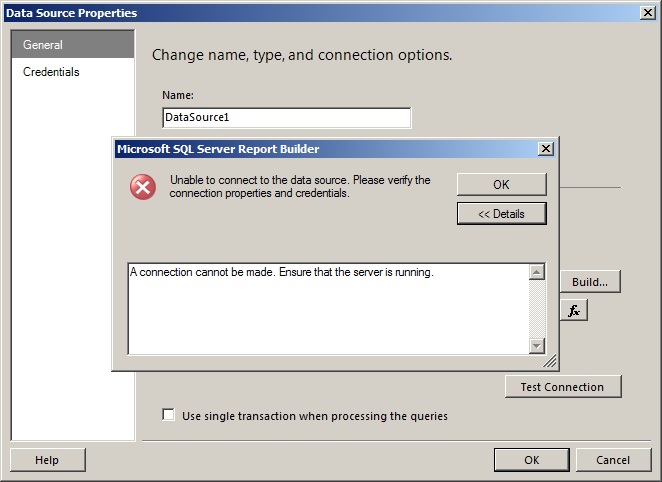
Well I thought of using BIDS, and I tried for around an hour. It was this error I was getting and then I had enough. 
Error
Then I thought to go forward with Report Builder.

Using Build selected a Server Name
Using the Build button, I have typed my server name and I did not change anything and tested the connection. Again I got this error "A connection cannot be made. Ensure that the server is running.".

Error
Then I went to Credentials tab and entered my created user account details.

Created account credentials

Came back and tested the connection. It said "Non-Windows user credentials were supplied for a non-http connection to Analysis Services."

Error
Then I went back to the credentials tab and ticked "Use as Windows credentials.".

Use as Windows credentials
Came back and again tested the connection and this time I got a message "Connection created successfully."

Connection created successfully.
So since the connection got created successfully, I thought to select a database. For that I clicked the Build button and clicked on the "Connect to a database" drop down box. Application got freezed for sometime and then there were no databases. I am pretty sure my remote Analysis Service has Adventure Works 2008R2 cube and I did a test connection from that window. Here is what I got.

Error
Isn't this weird? I was having a terrible time with this and then I logged in to my machine using created account. I opened SSMS, selected Analysis Services as Connect to Server type and clicked on Connect. I successfully got connected to remote Analysis Services. With BIDS and Report Builder, it was same as easy as SSMS. 

What I can't understand is, to access data in a remote Analysis Services, do we really have to create a same account as in remote machine and every time we need to access, do we have to switch our windows logins? I did a lot of testing in my test environment, but non of them worked. Please I am desperately looking for an answer to this. I really appreciate your valuable feedback.

Update - Tuesday, March 13, 2012

If you are using Report Builder, you can connect to remote Analysis Services using OLE DB as Connection type instead of Microsoft SQL Server Analysis Services.  

Select OLE DB
Click on Build button. On the next window, click on the drop down where "SQL Server Native Client 10.0" is highlighted and select "Microsoft OLE DB Provider for Analysis Services 10.0".

Select OLE DB Provider
Microsoft OLE DB Provider for Analysis Services 10.0 
Provide credentials of the created user which has access to remote  Analysis Services.

Provide credentials
Test Connection Succeeded.
You will see that, your test connection gets succeeded and you will receive all the database names in your remote Analysis Services in the Initial Catalog drop down box and you can select one as Initial Catalog.

Happy Coding.

Regards,
Jaliya

Saturday, March 10, 2012

What is ADOMD.NET

In simple, ADOMD.NET is an extension of ADO.NET. ADOMD.NET is a Microsoft .NET Framework data provider that is designed to communicate with Microsoft SQL Server Analysis Services. Using this extension we can read multidimensional schema, query cubes, and retrieve the results. ADOMD.NET commands or queries can be sent in Multidimensional Expressions (MDX), Data Mining Extensions (DMX), Analysis Services Scripting Language (ASSL), or even a limited syntax of SQL, and the command may or may not return a result.

The ADOMD.NET data provider is represented by the Microsoft.AnalysisServices.AdomdClient namespace which is included in the Microsoft.AnalysisServices.AdomdClient.dll located in,
"C:\Program Files\Microsoft.NET\ADOMD.NET\100."
Sample Connection
string conString = "Data Source=RAVANA;Initial Catalog=AdvWorks";
string query = "your MDX/DMX etc query";
AdomdConnection oAdomdConnection = new AdomdConnection(conString);
oAdomdConnection.Open();
AdomdCommand oAdomdCommand = new AdomdCommand(query, oAdomdConnection);
AdomdDataReader oAdomdDataReader = oAdomdCommand.ExecuteReader();
while (oAdomdDataReader.Read())
{
      //reading values
}
oAdomdDataReader.Close();
oAdomdConnection.Close();

The AdomdConnection class represents a connection to a multidimensional data source. The AdomdDataReader class retrieves a forward-only, read-only stream of data from a data source and is similar to other data reader classes in ADO.NET. The Read( ) method of the AdomdDataReader object advances to the next row and retrieves the results.

Happy Coding.

Regards,
Jaliya

Wednesday, March 7, 2012

ASP.NET Configuration Files

ASP.NET configuration data is stored in XML text files, each named Web.config. Web.config files can appear in multiple directories in ASP.NET applications. If you have Microsoft SharePoint installed, you can check it by observing folders in the following directory, "C:\inetpub\wwwroot\wss\VirtualDirectories".

Each Web.config file applies configuration settings to its own directory and to all the child directories below it. Settings in child directories can optionally override or modify settings that are specified by the parent directories. Apart from that additional Web.config files can be located in a Web site's subfolders to provide overrides that apply specifically to those folders within that site.

The root of the ASP.NET configuration hierarchy is the , "C:\Windows\Microsoft.NET\Framework\VersionNumber\Config\Web.config" file, which includes settings that apply to all ASP.NET applications that run a specific version of the Microsoft .NET Framework. Since each ASP.NET application that you will create will inherit from default configuration settings from the root Web.config file, you only need to create Web.config files for settings that will override the default settings.

There are number of important settings that can be stored in the configuration file. Here are some of the most frequently used configurations, stored conveniently inside Web.config file.
  • Database connectivity information
  • Session state information
  • Error Handling
  • Security

Happy Coding.

Regards,
Jaliya

Wednesday, February 29, 2012

Understanding Managed Extensibility Framework

Managed Extensibility Framework (MEF) is a new library which was introduced with .NET framework 4.0 for creating lightweight, extensible applications. What we can do with MEF is really amazing and it really just surprised me. So thought to write a post about MEF, because I am pretty sure it's going to be one of the nicest concepts introduced by Microsoft.

When we are developing an application, if we thought about the cost and the time, mainly it will be 20% for the original software development and the rest 80% will be for the software maintenance. The thing is later we will have to add new modules to original application which means we will have to extend the original application. When extending an application, as developers we know basically two things. That is KNOWN part and UNKNOWN part. The known part is since we know how we developed the application, we have the ability to change the source code. The unknown part is, if we want to plug our application with a third party application, we know nothing about their implementation. Because when we are developing, it wasn't a requirement.

So the best practice is to compose an application from various of pieces. As one of the principles in Object Oriented Design says, which is Open/Closed Principle, software entities should be open for extension but closed for modification. That is we should be able to extend the behavior of classes etc without modifying the source code. Classes' should have one reason to change. That is if one of the dependencies change like recently introduced bug etc.


Managed Extensibility Framework

Managed Extensibility Framework is designed to help developers to extend the application without changing the original source code. The core concept behind MEF is, MEF is aiming on composing an application which is dynamically compiled rather than statically compiled. To bring all these nice features MEF stands upon few concepts.
  1. Parts
    • An application is built of Parts. This is the core of MEF. You can think of it like building blocks of MEF.
  2. Export
    • Once you have implemented a Part, you can Export it. By exporting you are declaring "This part is available for the rest of the system. If you want it, you can consume it.".
  3. Import
    • Now think of another Part.  He is saying "I want this part for me to be perfect. I want to consume it.". When he is using your part, that is importing.
  4. Compose
    • To satisfy their needs we take all the Exports, we take all the Imports, we match them with each other and we are putting them with each other. How MEF really does is, in MEF there is a concept called Catalogs. Catalogs discovered the Parts and provide the Parts. And finally we have the Container which is a match maker. It is responsible for matching all the Exports with Imports.

For more information on MEF visit MSDN,

Hope you all got some basic understanding in Managed Extensibility Framework. Please feel free to post your valuable feedback.

Happy Coding.

Regards,
Jaliya

Tuesday, February 28, 2012

DataReader vs DataSet Performance

When accessing data with ADO.NET, you can use either a DataReader or a DataSet. For SqlClient provider, provider-specific object for DataReader is SqlDataReader which comes in
System.Data.SqlClient namespace. DataSet comes in System.Data namespace.

I will start with DataReader first. DataReader is part of ADO.NET connected architecture. I am not going to explain what is ADO.NET connected architecture and disconnected architecture. Because sometimes back I have blogged about Disconnected Data Access Architecture in ADO.NET. In DataReaders what hapens is, the DataReader loads one row at a time from the database. Each time the DataReader's Read() method is called, the DataReader discards the current row and advances to the next row. If there is a row it will return true and if there is not, it will return false. A DataReader is limited to being read-only and forward-only. That is, the information retrieved from the database cannot be modified by the DataReader, nor can the DataReader retrieve records in a random order. Instead, a DataReader is limited to accessing the records in sequential order, from the first one to the last one, one record at a time. So DataReaders are connected data objects because they require an active connection to the database.

DataSet is part of disconnected architecture in ADO.NET. Actually disconnected architecture is based on DataSets. DataSets can be thought of as in-memory databases. First get connected to the database, DataSet get filled up with data and connection to the database gets disconnected. Now you have all the data in the DataSet and you can manipulate them and write back changes to the database. Just like a database, DataSet is comprised of a set of tables, a DataSet is made up of a collection of DataTable objects. Whereas a database can have relationships among its tables, along with various data integrity constraints on the fields of the tables, so too can a DataSet have relationships among its DataTables and constraints on its DataTables' fields.

So, if we talk about the performance, there is a huge gap in these two. It's said that the DataReader is roughly thirty times more performant than the DataSet. In DataSets, since all the data will be loaded into memory, there is a overhead in memory.

Here is a nice article where you can see from the results, it doesn't seem to matter whether we are retrieving 10 or 10,000 records, the performance degradation of the DataSet is dramatic when compared to the DataReader.
     A Speed Freak's Guide to Retrieving Data in ADO.NET

Happy Coding.

Regards,
Jaliya

Friday, February 24, 2012

dynamic in C#

.NET framework 4.0 has introduced this new type which is dynamic. When we use the type dynamic, compile-time type checking will be bypassed and the type checking will be resolved at run time. I will explain it with a simple example. Let's take the following code.

     class Program
     {
          static void Main(string[] args)
          {
               dynamic t = new TestClass();
               Console.ReadLine();
          }
     }

     public class TestClass
     {
          public void TestMethod()
          {
                 Console.WriteLine("Dynamic");
          }
     }

Now if I build the solution, it will be successfully build. In my Main method, I have created an object of 'TestClass' and it's type is dynamic. Now here comes one of the nice thing.

dynamic I

When I try to call the 'TestMethod', intellisense will show me "This operation will be resolved at run time". It's of course because I have used dynamic. Look at the following image.

dynamic II

As you can see here I have called two methods. One is 'TestMethod' which is defined in 'TestClass' and the other is 'Test' which is not defined. The other nice thing is when I run the above program it will successfully compiled and will print "Dynamic". And just after control leaving the first ReadLine only it will throw the error.

dynamic III

So the point is, it will only throw you the error in the run time and not in the compile time.

I can write the same using var type. But when using var, the compiler determines the type in compile time. So not like using dynamic, intellisense will show all the available options. And if I use var here instead of dynamic and I try to call the method 'Test', compiler will throw me the error in compile time. So that's something about dynamic.

Happy Coding.

Regards,
Jaliya