|
| Available Hybrid Connections |
|
| Relay |
|
| Available Hybrid Connections |
|
| Relay |
In this post, let's see how we can programmatically add Operations to Swagger document in an ASP.NET Core Application.
I had a requirement where an Angular application uses DevExpress Report Viewer and the reports are being rendered through an ASP.NET Core API. Front-end communicates with BE through an Azure API Gateway. So basically all the back-end services endpoints need to be exposed via Azure API Gateway and it's getting updated by discovering the endpoints in back-end services Swagger documents. But unfortunately Swagger is failing to discover the DevExpress default reporting endpoints.
So I have overridden the default endpoints and applied [ApiExplorerSettings(IgnoreApi = true)] attribute. Now those endpoints will be ignored from getting generated into the Swagger Document, but still, I needed to programmatically add those.
It's actually quite simple. I just needed to create a new IDocumentFilter. IDocumentFilters are useful when we need to modify Swagger Documents after they're initially generated.
using Microsoft.OpenApi.Models;
using Swashbuckle.AspNetCore.SwaggerGen;
using System.Collections.Generic;
public class AddReportViewerOperationsFilter : IDocumentFilter
{
public void Apply(OpenApiDocument swaggerDoc, DocumentFilterContext context)
{
// Tags are for group the operations
var openApiTags = new List<OpenApiTag> { new OpenApiTag { Name = "ReportViewer" } };
// whatever the path
swaggerDoc.Paths.Add($"/api/{swaggerDoc.Info.Version}/Reports/Viewer", new OpenApiPathItem
{
Operations = new Dictionary<OperationType, OpenApiOperation>
{
// GET: /api/v1/Reports/Viewer
{
OperationType.Get,
new OpenApiOperation
{
Tags = openApiTags,
Responses = new OpenApiResponses
{
{ "200", new OpenApiResponse { Description = "Success" } }
}
}
},
// POST: /api/v1/Reports/Viewer
{
OperationType.Post,
new OpenApiOperation
{
Tags = openApiTags,
Responses = new OpenApiResponses
{
{ "200", new OpenApiResponse { Description = "Success" } }
}
}
}
}
});
}
}
So here I have just added 2 Operations, but you get the idea. You can define the Parameters for Operations if you want to, in my case, I didn't want to.
Finally, we need to register the AddReportViewerOperationsFilter when setting up Swagger.
public void ConfigureServices(IServiceCollection services)
{
// some code
services.AddSwaggerGen(config =>
{
// some code
config.DocumentFilter<AddReportViewerOperationsFilter>();
}); // some code }
And now, when we spin up the service, we can see the new operations that got added in the Swagger document.
|
| Swagger: Programmatically Added Operations |
Hope this helps.
Happy Coding.
Regards,
Jaliya
In this post, let's see how we can use Microsoft Edge WebView2 in a WPF Application to Sign In with an IdentityServer. This is inspired by the sample project available at IdentityModel/IdentityModel.OidcClient.Samples/WpfWebView where it's using WebBrowser. I wasn't happy with the appearance at all.
|
| Not Responsive |
|
| Not Responsive |
public class WpfEmbeddedBrowser : IBrowser
{
private BrowserOptions _options = null;
public async Task<BrowserResult> InvokeAsync(BrowserOptions options, CancellationToken cancellationToken = default)
{
_options = options;
var semaphoreSlim = new SemaphoreSlim(0, 1);
var browserResult = new BrowserResult()
{
ResultType = BrowserResultType.UserCancel
};
var signinWindow = new Window()
{
Width = 800,
Height = 600,
Title = "Sign In",
WindowStartupLocation = WindowStartupLocation.CenterScreen
};
signinWindow.Closing += (s, e) =>
{
semaphoreSlim.Release();
};
var webView = new WebView2();
webView.NavigationStarting += (s, e) =>
{ // Check whether we are navigating back to the RedirectUri specified in OidcClientOptions, // that means authentication process is completed
if (IsBrowserNavigatingToRedirectUri(new Uri(e.Uri)))
{
e.Cancel = true;
browserResult = new BrowserResult()
{
ResultType = BrowserResultType.Success,
Response = new Uri(e.Uri).AbsoluteUri
};
semaphoreSlim.Release();
signinWindow.Close();
}
};
signinWindow.Content = webView;
signinWindow.Show();
// Explicit initialization
await webView.EnsureCoreWebView2Async(null);
// Delete existing Cookies so previous logins won't remembered
webView.CoreWebView2.CookieManager.DeleteAllCookies();
// Navigate
webView.CoreWebView2.Navigate(_options.StartUrl);
await semaphoreSlim.WaitAsync();
return browserResult;
}
private bool IsBrowserNavigatingToRedirectUri(Uri uri)
{
return uri.AbsoluteUri.StartsWith(_options.EndUrl);
}
}
Happy Coding.
Regards,
Jaliya
public class Category
{
public int Id { get; set; }
public string Name { get; set; }
public ICollection<Product> Products { get; set; }
}
public class Product
{
public int Id { get; set; }
public string Name { get; set; }
public int CategoryId { get; set; }
}
public class MyDbContext : DbContext
{
public DbSet<Category> Categories { get; set; }
public DbSet<Product> Products { get; set; }
protected override void OnConfiguring(DbContextOptionsBuilder optionsBuilder)
{
optionsBuilder
.UseSqlServer("ConnectionString")
.LogTo(Console.WriteLine, LogLevel.Information);
}
protected override void OnModelCreating(ModelBuilder modelBuilder)
{
modelBuilder.Entity<Category>(builder =>
{
builder
.HasMany(x => x.Products)
.WithOne()
.HasForeignKey(x => x.CategoryId);
});
}
}
using var context = new MyDbContext();
await context.Database.EnsureDeletedAsync();
await context.Database.EnsureCreatedAsync();
var category = new Category() { Name = "Some Category" };
context.Categories.Add(category);
var product = new Product { Name = "Some Product", CategoryId = category.Id };
context.Products.Add(product);
await context.SaveChangesAsync()
protected override void OnModelCreating(ModelBuilder modelBuilder)
{
// HiLo Id generation For all the entities
//modelBuilder.UseHiLo();
modelBuilder.Entity<Category>(builder =>
{
builder
.HasMany(x => x.Products)
.WithOne()
.HasForeignKey(x => x.CategoryId);
// HiLo Id generation only for Category
builder
.Property(x => x.Id)
.UseHiLo("categoryseq");
});
}
|
| Valid CategoryId |
migrationBuilder.CreateSequence(
name: "categoryseq",
incrementBy: 10);
|
| Sequences |
|
| categoryseq |
SELECT NEXT VALUE FOR [categoryseq]
public class User
{
public int Id { get; set; }
public string Name { get; set; }
public Address Address { get; set; }
}
public class Address
{
public string Street { get; set; }
public string City { get; set; }
}
public class MyDbContext : DbContext
{
public DbSet<User> Users { get; set; }
//...
}
public class UserEntityConfiguration : IEntityTypeConfiguration<User>
{
public void Configure(EntityTypeBuilder<User> builder)
{
builder.ToTable($"{nameof(User)}");
builder.OwnsOne(x => x.Address);
}
}
|
|
| dbo.User |
public class UserEntityConfiguration : IEntityTypeConfiguration<User>
{
public void Configure(EntityTypeBuilder<User> builder)
{
builder.ToTable($"{nameof(User)}");
builder.OwnsOne(x => x.Address, y =>
{
y.Property(y => y.City)
.HasColumnName("City");
y.Property(y => y.Street)
.HasColumnName("Street");
});
}
}
|
|
| dbo.User |
using var context = new MyDbContext();
User user = new User
{
Name = "John Doe",
Address = new Address { Street = "Some Street1", City = "Some City1" }
};
await context.Users.AddAsync(user);
await context.SaveChangesAsync();using var anotherContext = new OrderDbContext();
user = await anotherContext.Users.FirstOrDefaultAsync();
SELECT TOP(1) [u].[Id], [u].[Name], [u].[City], [u].[Street]
FROM [User] AS [u]
public class User
{
public int Id { get; set; }
public string Name { get; set; }
public ICollection<Address> Addresses { get; set; }
}
public class Address
{
public string Street { get; set; }
public string City { get; set; }
public string Type { get; set; }
}
public class UserEntityConfiguration : IEntityTypeConfiguration<User>
{
public void Configure(EntityTypeBuilder<User> builder)
{
builder.ToTable($"{nameof(User)}");
builder.OwnsMany(x => x.Addresses, y =>
{
y.ToTable("UserAddress");
y.Property(y => y.City)
.HasColumnName("City");
y.Property(y => y.Street)
.HasColumnName("Type");y.Property(y => y.Street)});
.HasColumnName("Type");
}
}
using var context = new MyDbContext();
await context.Database.EnsureDeletedAsync();
await context.Database.EnsureCreatedAsync();
var user = new User
{
Name = "John Doe",
Addresses = new List<Address>
{
new Address { Street = "Some Street1", City = "Some City1", Type= "Shipping" },
new Address { Street = "Some Street2", City = "Some City2", Type= "Mailing" }
}
};
await context.Users.AddAsync(user);
await context.SaveChangesAsync();
using var anotherContext = new MyDbContext();
user = await anotherContext.Users.FirstOrDefaultAsync();
SELECT [t].[Id], [t].[Name], [u0].[UserId], [u0].[Id], [u0].[City], [u0].[Street], [u0].[Type]
FROM (
SELECT TOP(1) [u].[Id], [u].[Name]
FROM [User] AS [u]
) AS [t]
LEFT JOIN [UserAddress] AS [u0] ON [t].[Id] = [u0].[UserId]
ORDER BY [t].[Id], [u0].[UserId], [u0].[Id]
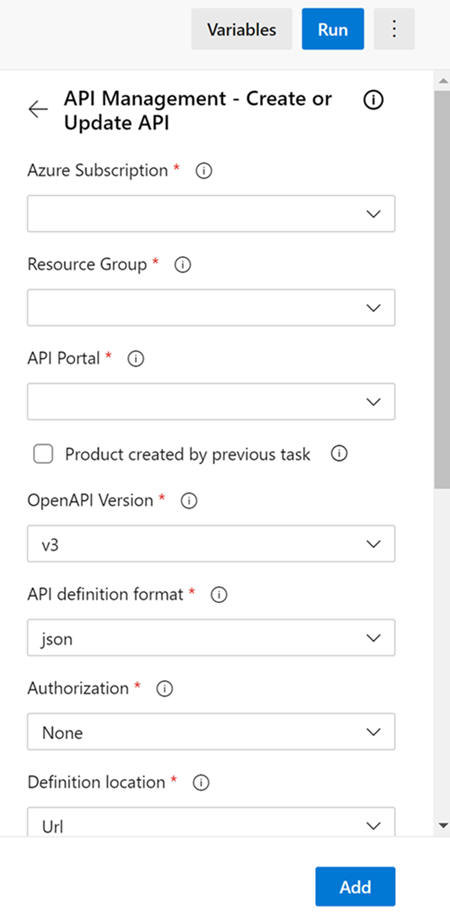
- task: stephane-eyskens.apim.apim.apim@5
displayName: 'API Management - Create/Update API '
inputs:
ConnectedServiceNameARM: ''
ResourceGroupName: ''
ApiPortalName: ''
UseProductCreatedByPreviousTask: false
product1: ''
OpenAPISpec: 'v3'
swaggerlocation: ''
targetapi: ''
DisplayName: ''
pathapi: ''
subscriptionRequired: false
TemplateSelector: Artifact
policyArtifact: '$(Pipeline.Workspace)\scripts\apim\apim-policy.xml'
MicrosoftApiManagementAPIVersion: '2018-01-01'
In this post, let's see how we can pass variables between Stages and Jobs in Azure Pipelines.
Consider the following simple pipeline.
stages:
- stage: Build
jobs:
- job: FirstJob
pool:
vmImage: 'windows-latest'
steps:
- bash: echo "##vso[task.setvariable variable=myVariable;isOutput=true]Hello World"
name: stepSetVariable
- job: SecondJob
dependsOn: FirstJob
pool:
vmImage: 'ubuntu-latest'
variables:
# Map variable
# syntax: $[ dependencies.{JobName}.outputs['{stepName}.{variableName}'] ]
myJobVariable: $[ dependencies.FirstJob.outputs['stepSetVariable.myVariable'] ]
steps:
# Echos Hello World
- script: echo $(myJobVariable)
name: stepEchoVariable
- stage: Deployment
dependsOn: Build
pool:
vmImage: 'macOS-latest'
variables:
# Map variable
# syntax: $[ stageDependencies.{BuildName}.{JobName}.outputs['{stepName}.{variableName}'] ]
myStageVariable: $[ stageDependencies.Build.FirstJob.outputs['stepSetVariable.myVariable'] ]
jobs:
- job: DeploymentJob
steps:
# Echos Hello World
- script: echo $(myStageVariable)
name: stepEchoVariable
Here,
$[ dependencies.{JobName}.outputs['{stepName}.{variableName}'] ]
$[ stageDependencies.{BuildName}.{JobName}.outputs['{stepName}.{variableName}'] ]
Note: I have used different images for two jobs in Build stage and for the Deployment stage, so the concept is more clear.
Hope this helps.
Happy Coding.
In this post, let's see how we can exclude Tables from Migrations in EF Core 5.0. It's actually pretty easy.
Consider the below use case.
public class IdentityDbContext : DbContext
{
public DbSet<ApplicationUser> ApplicationUsers { get; set; }
protected override void OnConfiguring(DbContextOptionsBuilder optionsBuilder)
{
// Configuring
}
}
public class OrderDbContext : DbContext
{
public DbSet<ApplicationUser> ApplicationUsers { get; set; }
protected override void OnConfiguring(DbContextOptionsBuilder optionsBuilder)
{
// Configuring
}
}
public class ApplicationUser
{
public int Id { get; set; }
public string Name { get; set; }
}
Here the ApplicationUser is shared between two DbContexts (IdentityDbContext and OrderDbContext). And now let's say between these two DbContexts, we are only going to maintain full ApplicationUser information in only IdentityDbContext. In that case, we don't want further changes on ApplicationUser to be applied on OrderDbContext.
To achieve that, we can exclude the ApplicationUser in migrations for OrderDbContext as below.
protected override void OnModelCreating(ModelBuilder modelBuilder)
{
modelBuilder.Entity<ApplicationUser>().ToTable("ApplicationUsers", t => t.ExcludeFromMigrations());
}
Unfortunately, we need to call ToTable and from there customize the TableBuilder to ExcludeFromMigrations.
Hope this helps.
Happy Coding.
Regards,
Jaliya